How to Unlock Gotrax Scooter: G4 and GMAX Ultra Steps
This post contains affiliate links. As an Amazon Associate, we earn from qualifying purchases.
To use your Gotrax scooter, you need to enter a default passcode, usually 000 or 0000, on the digital display. For the G4 model, press the ‘+’ button to input 0, then press the power button to set each digit; after three zeros, press the power button twice.
That “000” is printed in the manual for a reason. It’s the universal key the factory ships with, and entering it wrong, or too slowly, is what locks people out. This is the first step in learning how to start your Gotrax scooter.
What follows is a breakdown of the two main lock systems Gotrax uses, the exact button sequences for the G4 and GMAX Ultra, and what to do when the simple answer stops working. By the end, you’ll know which lock you’re dealing with and how to beat it.
Key Takeaways
- The default passcode for most Gotrax scooters is 000 for the digital display lock and 0000 for the physical tiller lock.
- If the default code doesn’t work, a hidden reset button behind the display on models like the G4 can restore factory settings.
- Attempting to ride a locked scooter triggers an alarm and disables the motor; entering the correct code is the only way to stop it.
- Always power off the scooter before folding or unfolding it to avoid damaging the latch or electronics.
- For complex lock issues, your first stop should be the official Gotrax manuals page for your specific model.
Unlocking the G4 Digital Display Lock
The G4’s security lives on its console. You’re not dealing with a key; you’re inputting a three-digit PIN.
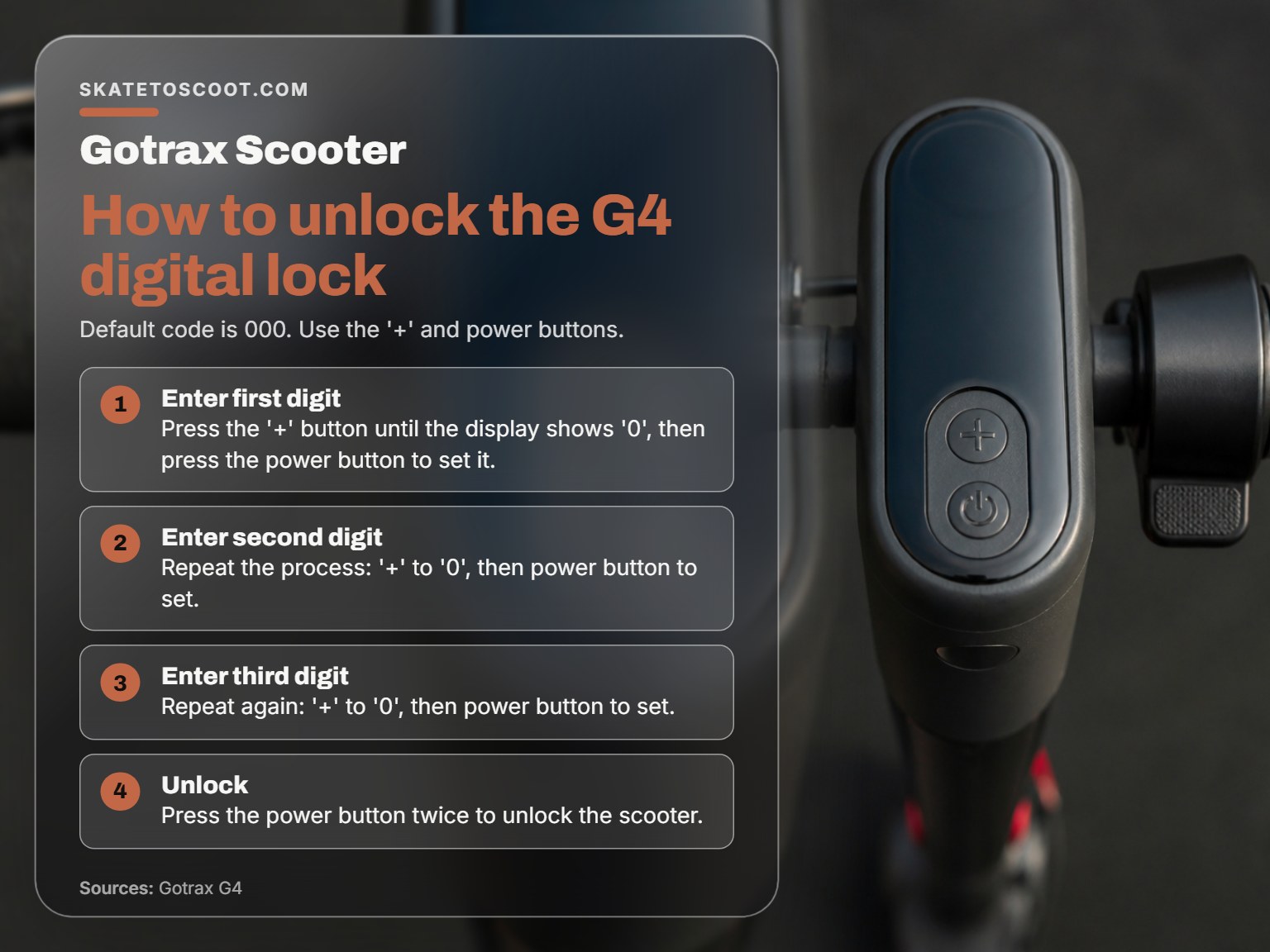
To unlock the display lock the password is 000. Use the “ + “ button to input 0 and press the power button to set. Repeat the process to enter in the full code 000. Once all three zero’s have been selected, press the power button twice to deactivate the lock.
That’s the verbatim instruction from the G4 manual. The rhythm matters. Press the ‘+’ button until the display shows ‘0’, then hit the power button to lock in that digit. Do that three times. The final step, pressing the power button twice, is what actually disables the lock. Miss that double-press, and the scooter stays locked.
I’ve watched new owners at the park tap in the zeros, then stare at a scooter that won’t move. The console lights up, but the throttle does nothing. That’s the lock still being active. The double-press is the commit.
Here is the step-by-step sequence:
- Press the Power Button to wake up the display.
- Press the ‘+’ Button until the screen shows ‘0’.
- Press the Power Button to set that digit. (You’ll often hear a beep).
- Repeat steps 2 and 3 two more times to enter ‘0’ and ‘0’.
- Finally, press the Power Button twice quickly.
You should hear a distinct confirmation beep. The scooter is now ready to ride.
When 000 Doesn’t Work: The Reset Button Fix
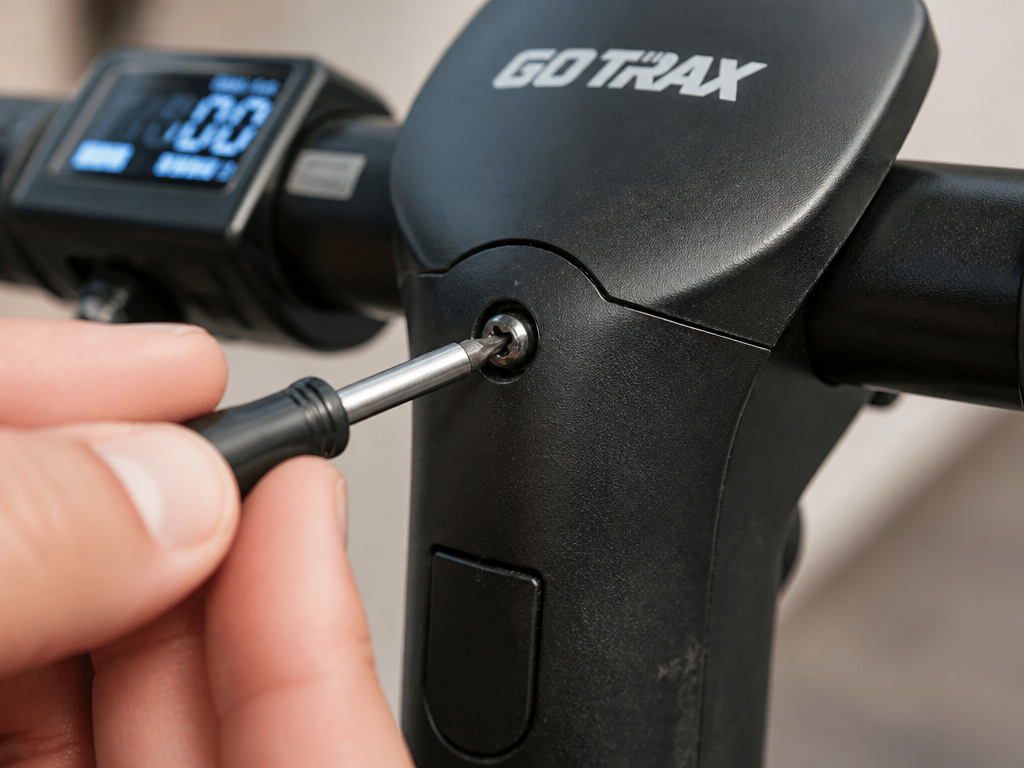
Sometimes the default code just stops accepting input. A Reddit thread from 2021 is a graveyard of G4 owners with this exact problem: “the 3 digit digital lock refuses to accept the code.”
You’ll need to remove the console by unscrewing it from the tiller.
Common mistake: Assuming a forgotten code means the scooter is bricked. The physical reset is almost always the answer.
The procedure isn’t in the basic manual, but it’s straightforward:
- Power off the scooter.
- Remove the screws securing the display console to the tiller.
- Gently separate the console to find a small pinhole button on the circuit board.
- Reassemble the console, turn the scooter on, and try the default code 000 again.
This forces a factory reset, wiping any user-set code. It’s the nuclear option, but it works.
The GMAX Ultra’s Dual Lock System
The GMAX Ultra takes security up a notch with two independent locks: a digital console lock and a physical cable lock built into the tiller.
Digital Lock (Console):
The process is similar to the G4 but with a different combo for changing the code. To start the scooter, you still enter 000 using the ‘+’ and power buttons. However, to set a new code on the G4 digital lock, press the ‘+’ button and the power button together for 10 seconds, then use the ‘+’ button to input each digit, pressing the power button to set each one. This is a different task from starting the scooter.
Physical Tiller Lock:
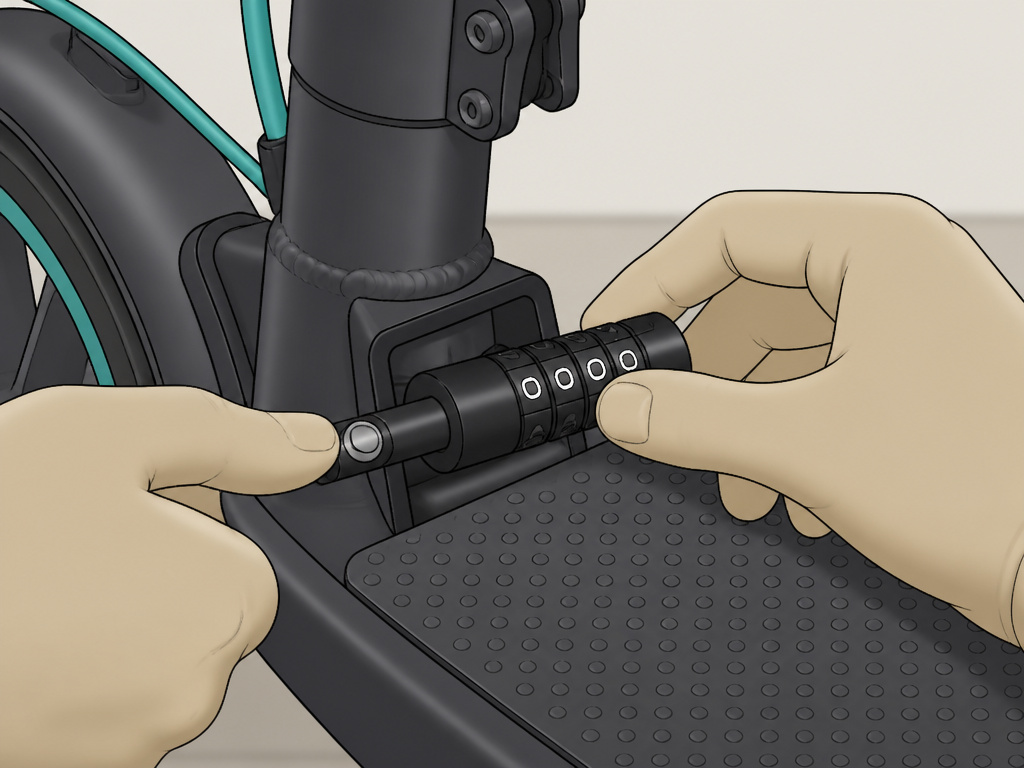
This is a combination wheel lock that secures the folding mechanism. The default combination is 0000.
| Action | Procedure |
|---|---|
| Lock the Tiller | 1. Adjust the password wheels to show 0000. 2. Pull the lock pin from the tiller and insert it into the lock hole on the deck. 3. Scramble the wheels away from 0000. |
| Unlock the Tiller | 1. Adjust the password wheels back to 0000. 2. Press the button on the lock pin and pull it out of the deck hole. 3. Insert the pin back into its housing on the tiller. |
The physical lock is purely mechanical. If you forget your custom code, you can’t reset it without the default. Always set a code you’ll remember, or just leave it at 0000 if you’re only using it for casual theft-deterrence.
Is It a Lock or a Latch? Unfolding a Stuck Scooter
A scooter that won’t open isn’t necessarily locked with a code. Often, it’s the simple folding latch that’s stuck. This is a physical problem, not an electronic one.
The hook that latches the tiller to the fender can bind, especially if the scooter was folded under pressure or stored in a hot car. The fix is always mechanical force and finesse, not a passcode.
The unlatching procedure from the G4 manual is clear: Ensure the scooter is powered off. Press the lock buckle, pull down the release lever, and fold the tiller down. To unfold, you reverse it: disconnect the hook, pull the tiller up, and lock the clamping device.
When it’s stuck, the community wisdom is simple: push down on the fender itself. One Reddit user summed it up: “I had three people this weekend looking at my gotrax scooter trying to unfold it saying it just doesn’t work. I walked up pushed the fender down til it touched the tire and it unfolded.”
The plastic fender has enough flex to release the hook. Don’t yank the tiller; you’ll break the latch. Push the fender, then lift.
What to Do When the Alarm is Beeping
The security system has one job: be loud and annoying if you try to ride without entering the passcode. According to the Gotrax FAQ, if you attempt to ride a locked scooter, “the alarm may start beeping, and the scooter’s electric features will be inoperable.”
The solution is not to disconnect the battery; you need to enter the correct passcode on the display, which is the fundamental answer to how to start a Gotrax scooter.
- Stop trying to use the throttle.
- Bring the scooter to a halt and power it on if it’s off.
- Enter the correct passcode (000 or your custom code) using the proper button sequence.
- The beeping should stop immediately once the code is accepted and the lock is disengaged.
If the alarm continues after a successful code entry, you might have a different issue, like a faulty console sensor. At that point, a factory reset is the next logical step.
Troubleshooting: Scooter Unlocked But Won’t Move
You’ve entered the code. The beeping stopped. But pressing the throttle does nothing. Before you blame the lock, run through this quick checklist.
- Is it in Kick-to-Start Mode? Many Gotrax models require a push start. You need to kick off manually until you reach about 3 mph, then press the throttle.
- Is the Battery Charged? A dead battery will show no response. Charge your Gotrax using the official charger and look for a red light indicating active charging.
- Is There a Physical Brake Engagement? Some scooters have a safety sensor that cuts motor power if the brake lever is slightly engaged. Check that the brake lever has fully returned to its resting position.
- Did You Perform a Full Power Cycle? Turn the scooter off, wait 30 seconds, and turn it back on. Then re-enter the passcode. This clears any temporary electronic glitches.
If all else fails, the problem may be deeper than the lock. You’ll need to diagnose a dead scooter, checking connections, fuses, and the controller.
How to Unlock a Gotrax Scooter with the Power Button
That’s not quite how it works. Simply holding the power button turns on the scooter’s display, but it won’t activate the electric drive system. If the scooter is locked, the alarm may beep and the throttle will be disabled. To stop the alarm and begin riding, you need to enter the correct passcode. For many models, the default is either 000 or 0000. Entering this code properly tells the scooter you’re the authorized rider. Once the correct sequence is input, the lock disengages, allowing you to use the throttle and ride.
Frequently Asked Questions
How do I unlock my Gotrax scooter if I forgot the code?
If you’ve set a custom code and forgotten it, your primary recourse is the physical reset button on the back of the display (on models like the G4). Holding this button for 15 seconds will restore the default code to 000. If your model lacks a reset button, you may need to contact Gotrax support with proof of purchase.
What is the default code for a Gotrax scooter?
For most Gotrax e-scooters, the default passcode is either 000 (for digital display locks) or 0000 (for physical tiller combination locks). This is confirmed in both the G4 manual and the official Gotrax FAQ.
Why is my Gotrax scooter beeping and not moving?
Persistent beep with no movement almost always indicates the anti-theft lock is active. The scooter is locked. You must enter the correct passcode on the display to disable the alarm and restore motor function. Attempting to ride while it’s beeping will not work.
Can I permanently disable the passcode lock on my Gotrax?
Yes, on some models. For the GMAX Ultra, pressing the ‘-‘ button and the power button together for 10 seconds will disable the digital lock feature entirely, as per the manufacturer’s blog. For other models, check your specific manual. You cannot disable the physical tiller lock; you can only set it to 0000.
Before You Go
Starting a Gotrax scooter boils down to three things: knowing which lock you have, entering the default code with the right timing, and remembering the reset button exists.
That final press is what tells the system you’re done.
If you ever face a problem that feels bigger than a forgotten code, like a motor that won’t engage after a successful start, the path forward is systematic, moving beyond the basic how to start a Gotrax scooter procedure. Start with a full power cycle and a battery check. Then move to a soft reset. Treat it like a skate setup: methodical checks beat frantic troubleshooting every time.