Maintaining Your Hoverboard Tips and Tricks: Step-by-Step
This post contains affiliate links. As an Amazon Associate, we earn from qualifying purchases.
Proper hoverboard maintenance depends on three essential rules: use only the supplied charger, never leave it charging unattended, and store it within the specific temperature and humidity ranges printed in your manual. These steps prevent battery damage, reduce fire risk, and add years to the board’s life.
That last point, the specific ranges, is where most guides stop. They tell you “store it in a cool, dry place” and move on. Your Hoverzon S manual says 14°F to 122°F (-10°C to 50°C) and 65% humidity, plus or minus 20%. Your Sharper Image board manual says 5% to 95% humidity. Those aren’t the same thing. A generic tip won’t cut it. For maintaining your hoverboard tips and tricks, you need specifics.
What follows: the exact numbers from four manufacturer manuals, the one cleaning mistake that kills the gyroscope, a storage plan that accounts for seasonal changes, and the recalibration trick that fixes 80% of ride issues, all part of maintaining your hoverboard tips and tricks. This isn’t about making it look nice. It’s about keeping the wheels under you and the battery from becoming a hazard.
Key Takeaways
- Use only the manufacturer’s charger. The CPSC links over 250 fire incidents to hoverboards; third-party chargers bypass built-in safety circuits.
- Never charge unattended or overnight. Multiple safety sources, including the CPSC and the Jetson manual, explicitly forbid charging unattended or overnight. A full charge time varies by model; for example, the Sharper Image Hover Board takes about 130 minutes for a full charge.
- Match storage conditions to your manual. Humidity specs conflict (Hoverzon: 65% ±20%; Sharper Image: 5%-95%). When sources disagree, follow your specific board’s guidance.
- Clean only when powered off. Wiping a powered-on board can trigger the foot sensors, causing a sudden lurch or calibration drift.
- Recalibrate on a hard, level surface. An uneven floor during the 20-30 second light-flash sequence locks in a permanent balance error.
The Charging Rules That Prevent Fires
The charger is the single most dangerous piece of your hoverboard kit. It’s not an accessory; it’s a regulated power supply for a lithium-ion battery. Get this wrong, and you’re not looking at a dead board, you’re looking at a thermal runaway.
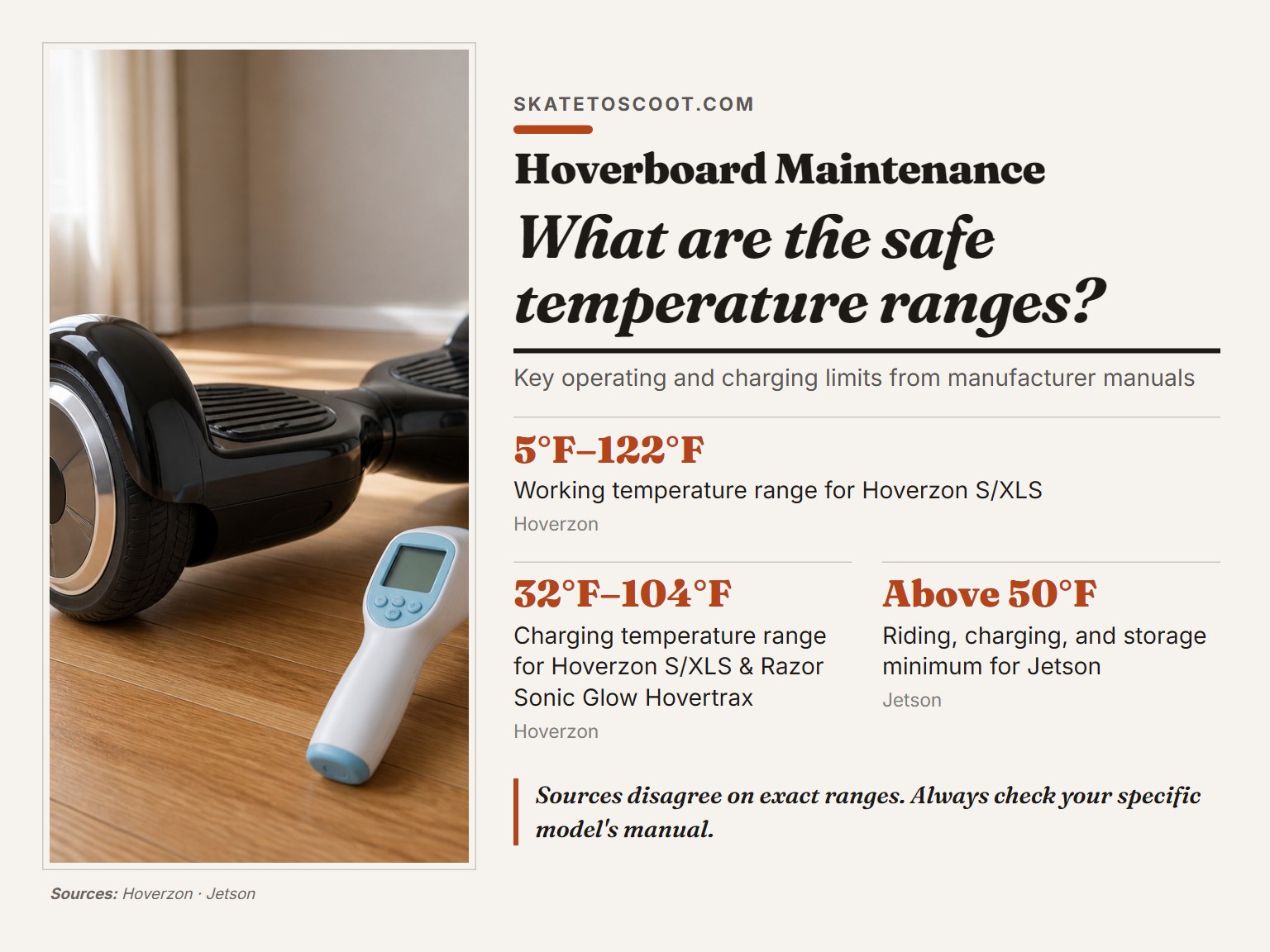
Charge only within the specified temperature range. For the Hoverzon S/XLS, that’s 32°F–104°F (0°C–40°C). The Razor Sonic Glow Hovertrax manual states not to charge at or below 32°F, and the Sharper Image manual advises bringing the board to a warm environment for charging and not charging below 32°F. Charging below freezing can cause lithium plating inside the battery cells, a hidden defect that surfaces as sudden failure months later.
The official stance is unambiguous. The CPSC hoverboard safety alert states: “Only charge a hoverboard when you are there to watch it. Do not charge unattended, especially overnight.” That’s not a suggestion. It’s a summary of incident data involving over 250 fires, two fatalities, and millions in property damage.
Your charging ritual should look like this:
- Inspect the charger and port. Look for bent pins, frayed cables, or debris in the charging port. A damaged charger is a no-go.
- Plug the charger into the wall first. Then connect it to the board. This sequence avoids power surges.
- Watch for the light change. Most chargers have an LED that shifts from green to red when actively charging. If it stays green, the board is either full or there’s a connection problem.
- Time it. According to the Sharper Image manual, a full charge takes about 130 minutes; 80% charge takes 90. Set a timer.
- Unplug immediately after completion. Don’t let it sit on the charger for hours “topping up.” That continuous trickle degrades the battery.
Where this goes sideways: Using a phone charger or a generic lithium-ion charger. They might physically fit, but their voltage and amperage profiles are wrong. The board’s battery management system expects a specific signal. The wrong charger bypasses safeguards, and the first sign of trouble is often the smell of burnt plastic.
Battery Care for Maximum Lifespan
Lithium-ion batteries hate two things: being completely drained and being held at 100% charge. Your maintenance goal is to keep them in the middle, the 20% to 80% sweet spot, as much as possible.
The red LED warning light isn’t just a suggestion. On the Sharper Image Hover Board, a red light means power is at 20% or less. When you see it, stop riding. Pushing the board to zero repeatedly is the fastest way to shorten its overall hoverboard lifespan. The Razor manual is blunt: “Do not ride… When its battery is low, as indicated by a flashing red light and beeping. The Razor Sonic Glow Hovertrax may stop operating and cause you to fall.”
Here’s where the manuals disagree, and you need to pick a lane based on your board:
| Manufacturer | Storage Charge Level | Recharge Interval During Storage |
|---|---|---|
| Hoverzon | Fully charge before storing. | Discharge and recharge every 3 months if stored >1 month. |
| Sharper Image | Charge at least once every 3 months. (Implies partial charge is okay.) | Every 3 months. |
| Jetson | Fully charge before extended storage. | Fully charge once a month. |
If your manual is lost, consult the manufacturer’s website, as recommendations differ: Hoverzon advises fully charging before storage, Sharper Image advises charging at least once every three months, and Jetson advises fully charging before extended storage and once a month during storage. This prevents the voltage from dropping so low that the battery protection circuit permanently disables it, a condition known as “bricking” that requires a professional battery replacement.
The 5-Step Cleaning Process (Without Damage)
Cleaning a hoverboard isn’t about shine. It’s about removing grit that grinds down wheel bearings and conductive debris that can short the footpad sensors. Do this wrong, and you’ll need a troubleshooting guide for mysterious wobbles.
Power off the board completely. Do not just put it in standby. Hold the power button until all lights turn off. A damp cloth dragged across an active sensor pad can trigger a motor response, making the board jerk out of your hands.
The Hoverzon manual is specific: “Wipe the outer shell with a soft, dry cloth. The Hoverzon can withstand small splashes of water but do not submerge.” That’s your baseline.
- Wipe down the body. Use a microfiber cloth, slightly dampened with water only. No cleaners, no solvents. Wipe along the seams, not across them, to avoid forcing moisture inside.
- Clean the wheel treads. Pick out pebbles and packed mud with a plastic pick or stiff brush. Caked-on debris throws off the wheel balance, a common cause of hoverboard shaking.
- Dry the charging port. Use a dry cotton swab to gently remove lint. Corrosion here is a top reason for charging problems.
- Check the footpad grips. Ensure they’re secure and free of sand. A loose grip can affect your footing and control.
- Let it air dry. Before turning it on or storing it, give it 10 minutes in a well-ventilated area to ensure all moisture has evaporated.
The Jetson guide adds a critical warning: “If the electric parts or battery get wet, do not power on the hoverboard.” If you see moisture near any seam or port, walk away and let it dry for 24 hours. Turning it on wet is how you turn a simple clean-up into a motherboard replacement.
Smart Storage for Off-Season or Infrequent Use
Storage is where battery chemistry and environmental control meet. You’re not just putting it in a closet; you’re putting it into a controlled hibernation.
First, know your board’s limits. The Hoverzon S/XLS working range is a wide 5°F to 122°F (-15°C to 50°C), but its storage range is 14°F to 122°F (-10°C to 50°C). The Razor Sonic Glow operates between 14°F and 104°F (-10°C to 40°C). The Jetson Stereofly simply says “above 50°F.” Storing outside the recommended temperature range can damage the battery.
Common mistake: Storing the board on its side or upside down for months. This can put prolonged stress on the plastic shell. Store it upright on its wheels.
Follow this checklist before long-term storage:
- Charge to the level your manual specifies (see the table in the Battery Care section).
- Power off completely. Don’t rely on auto-shutoff.
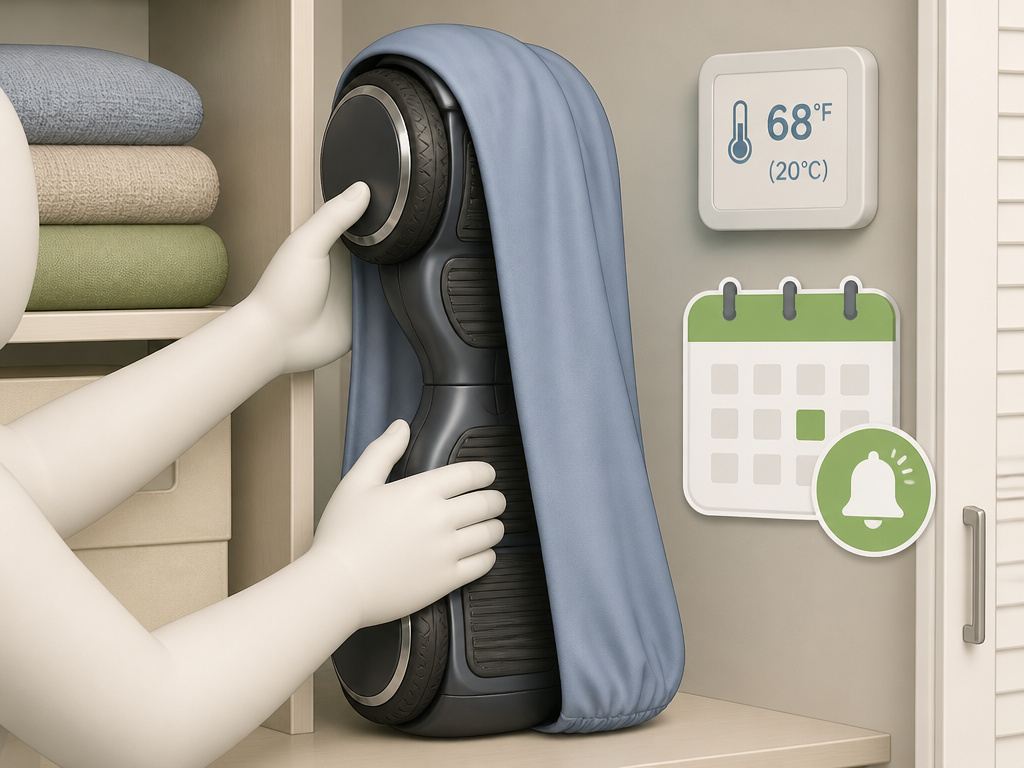
- Place in a climate-controlled environment. A closet inside your home beats a garage or shed.
- Cover it with a cloth bag (not plastic) to keep dust out, as the Hoverzon manual advises.
- Set a calendar reminder for your board’s required recharge interval (every 1 or 3 months).
- Keep it away from flammable materials. The CPSC warning extends to storage, not just charging.
This proactive approach is the core of maintaining your hoverboard tips and tricks and is cheaper than a hoverboard repair next season. A little preparation prevents the deep discharge that kills batteries.
Regular Inspection and Recalibration
A 30-second visual check before each ride catches problems before they strand you. Look for three things: tire wear, loose body panels, and clean charging contacts.
Tire wear is straightforward. Bald spots or uneven tread mean replacement time. A wobbly wheel may indicate a mechanical issue. Listen for grinding sounds during a slow test spin, which may indicate a problem.
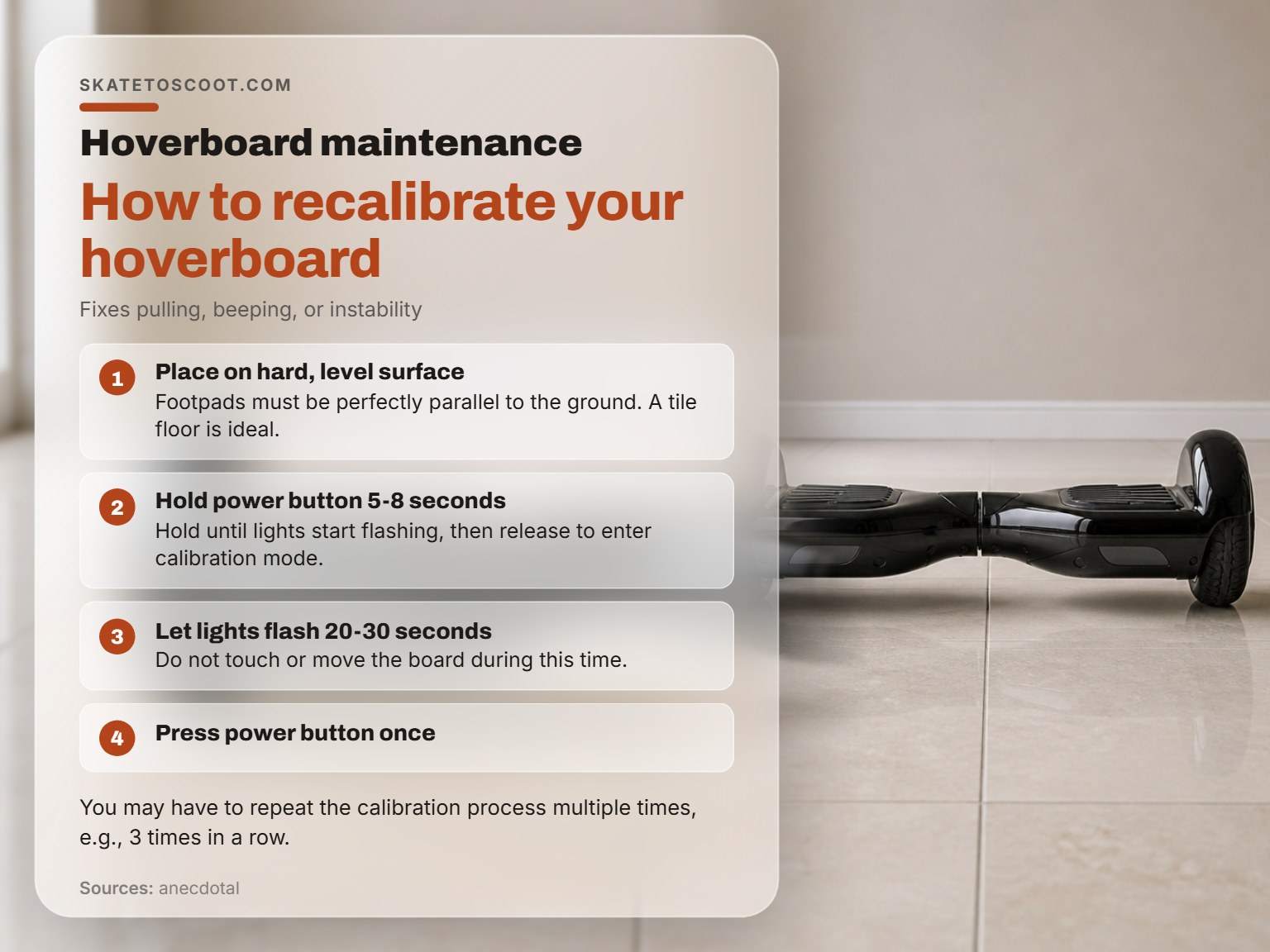
Recalibration can address issues like one side pulling, constant beeping, or instability. The community-tested method from Hoverboards.com works for most models:
- Place the board on a hard, level surface. A tile floor is ideal; carpet is not. The footpads must be perfectly parallel to the ground.
- Press and hold the power button for 5-8 seconds until the lights start flashing, then release.
- Let the lights flash for 20-30 seconds. Do not touch or move the board.
- Quickly press the power button once to turn it off. The gyroscope calibration is now complete.
You may need to repeat this process three times in a row for a stubborn board. If recalibration doesn’t solve a shaking or balance issue, there may be a hardware problem.
What are the main parts of a hoverboard?
The core components are the battery, motors, gyroscopes, and the charger. The battery is almost always a lithium-ion type and is the most critical part for safety and performance. Motors in each wheel provide propulsion and balance. Gyroscopes and sensors tell the board how to stay level and respond to your movements. The charger is a specific power supply matched to your board’s battery; using any other charger can be dangerous. Always power the board off completely before cleaning any part of it to protect the internal electronics.
When should I take my hoverboard to a professional?
Consider professional servicing for any issue involving the battery, charger, or internal wiring. Due to the risk of fire, you should not attempt to open the battery compartment or repair electrical components yourself. If your board was purchased before a certain date, it may not meet current safety standards, and a professional can assess its condition. For persistent calibration problems that the standard reset process doesn’t fix, a technician can check the gyroscopes and sensors. Any sign of swelling, damage, or overheating from the battery compartment means you should stop using the board immediately and seek expert help.
Frequently Asked Questions
How often should I clean my hoverboard?
Clean your hoverboard when it becomes dirty from use. A quick wipe-down of the body and a check of the wheel treads takes two minutes and prevents long-term damage. Periodically perform a more thorough cleaning, checking ports and grips.
Can I use a hose or pressure washer to clean my hoverboard?
No. Never. Even models marketed with some water resistance are not designed for direct water jets. Submerging any part can lead to immediate failure. The manual-approved method is a damp cloth only.
What does UL 2272 mean, and why does it matter?
UL 2272 is a safety standard for the entire hoverboard unit, covering electrical system safety and battery integrity. The CPSC states any board bought before January 29, 2016, is not compliant. Look for the holographic UL mark on the product itself, not just claims about the battery or charger. Compliance reduces fire risk but, as the CPSC notes, does not eliminate it.
My hoverboard was stored for 6 months and won’t turn on. What now?
The battery is likely deeply discharged. Try leaving it on the correct charger for an extended period as specified in your manual. If there’s no sign of life (no lights, no charger LED change), the battery’s protection circuit may have locked it out. This typically requires professional service or a battery swap.
Is a protective case worth it?
For long-term storage or transport, yes. A good protector case cushions against impacts and keeps dust and moisture out. For daily use, it’s overkill. The best protection is proper handling and storing it upright in a clean, dry place.
Before You Go
Maintenance isn’t a periodic chore; it’s a set of habits you build around a device with spinning wheels and a high-density battery. The rules are simple because the consequences of ignoring them are severe: fires, sudden failure, and injury.
Start with your manual. If you’ve lost it, download it from the manufacturer’s website. Its specific numbers, like charging temperature ranges and storage humidity, are your blueprint. When you see a generic tip online, cross-reference it with your manual’s actual specs. That’s the difference between a board that lasts a season and one that lasts for years.
Commit to the two essential habits: never charge unattended, and always store within the printed temperature range. Everything else, the cleaning, the inspections, the recalibrations, supports those two pillars. Do that, and you’ll spend your time riding, not repairing.