How Long Do Hoverboards Last? The Three-Timeline Answer
This post contains affiliate links. As an Amazon Associate, we earn from qualifying purchases.
How long a hoverboard lasts depends on three separate clocks: a single charge (6-12 miles), a battery’s rated lifespan (varies by model), and the device’s total service life (which depends on maintenance). Your weight, the terrain, and how you charge it are the three things that decide which timeline you actually get.
That 12-mile figure isn’t a guarantee. It’s a lab result on a smooth floor with a 165-pound rider. Put a 250-pound adult on a grassy hill, and you might see a significantly reduced range. The battery doesn’t just die at the end of a ride; it degrades a tiny bit each time you plug it in.
What follows is a breakdown of each timeline, grounded in actual manufacturer manuals and a federal safety report. You’ll get specific numbers from real models, a direct comparison of why brands disagree on storage rules, and a clear path to diagnosing why your board’s range suddenly dropped.
Key Takeaways
- A single charge lasts 6-12 miles, but real-world factors like rider weight and hills can cut that in half.
- The battery lifespan is measured in full charge cycles; proper charging habits are the single biggest factor in maximizing it.
- Cold is a range-killer; the Gyroor Y1S manual notes range can be halved at -4°F (-20°C) compared to room temperature.
- Never let the battery drain to 0%; both the Gyroor and Sportstech manuals state this can cause permanent damage or impair functionality.
The Single-Charge Lifespan: Miles and Minutes
How far can you actually go before the red light comes on? The answer lives in your owner’s manual, not in a generic blog post.
The Sharper Image Hoverboard (204257) manual states a max range of 12 miles on a full charge, with a max speed of 6-10 mph. That translates to a significant amount of riding time at average speed. The manual is blunt about what cuts into that: rider weight, temperature, and surface conditions. Its red LED indicator light means power is down to 20% or less, that’s your cue to head home.
A fully charged Sharper Image Hoverboard (Item No. 204257) provides up to 12 miles of range under ideal conditions, with a normal full charge time of approximately 130 minutes and an 80% charge achievable in 90 minutes. The optimal charging temperature range is 32°F to 100°F.
Other models tell a similar story with different numbers. The Denver HBO-6620 doesn’t list a specific range but warns that its battery indicator shows red when 15-20% power remains. The takeaway is consistent: manufacturers design for a specific energy capacity (the Sharper Image uses a 36V, 4.4Ah, 158Wh battery), and everything else is a subtraction from that ideal.
Here’s what that subtraction looks like in practice:
| Factor | Effect on Range | Why It Happens |
|---|---|---|
| Rider Weight | Significant reduction | The motors must work harder to accelerate and maintain speed, drawing more current from the battery. |
| Inclines & Terrain | Major reduction | Climbing even a 15° slope (the Sharper Image’s max) demands peak power, draining the battery rapidly. |
| Low Temperature | Can be severe | The Gyroor Y1S manual states range can be halved at -4°F (-20°C). Cold slows chemical reactions inside the lithium cells. |
| Aggressive Riding | Moderate reduction | Frequent hard starts and stops waste energy as heat instead of forward motion. |
The beeping alarm you hear when approaching top speed isn’t just a warning; it’s the board’s software trying to preserve the last of your battery by forcing a slowdown. Ignoring it and pushing on a red indicator risks a deep discharge.
The Total Lifespan: Years and Charge Cycles
The battery isn’t the only thing with a clock. The motors, tires, and frame wear down too. But the battery is the heart of the matter, and its health defines the hoverboard’s useful life.
Lithium-ion batteries are rated for a certain number of full charge cycles, a cycle being a full drain from 100% to 0% and back. A pack rated for a high number of full charge cycles will last longer before its capacity degrades. After that point, your 12-mile range might be 9 or 10 miles. It’s not broken, just diminished.
Be realistic about those cycles. You rarely do a full 100%-0% run. A 50% discharge and recharge counts as half a cycle. So hitting 500 cycles could take years of regular use. The real threat isn’t the cycle count itself; it’s how you manage the battery within those cycles.
Where this goes sideways: Leaving a hoverboard plugged in for days after the light turns green. The Denver HBO-6620 manual explicitly says “the charger must be disconnected when the battery is fully charged.” Overcharging stresses the cells and accelerates the capacity fade the cycle rating measures.
The other components have their own timelines that factor into how long do hoverboards last. The tires on hoverboards can wear down over time. The motors have performance limits; the Sharper Image has a 250 lb max load for a reason. The frame’s durability can affect the hoverboard’s overall lifespan. A well-built board from a brand like Sharper Image prioritizes a reinforced frame and motors with better thermal management, aiming for a longer total service life before a major repair like a hoverboard battery replacement is needed.
Step-by-Step Battery Replacement Guide

When the red light comes on after just a few miles, or the board won’t hold a charge, the battery is the likely culprit. Replacing it yourself is often straightforward and far cheaper than buying a new board.
Before you start: You’re dealing with a lithium-ion battery pack. Work in a dry, open area away from anything flammable. Have the correct replacement battery (check your model number!) and basic tools, usually a Phillips screwdriver and a plastic pry tool, ready. Disconnect the old battery before handling any other internal wiring.
- Power down and open the chassis. Turn the hoverboard completely off. Remove all screws from the bottom casing. Use a plastic tool to gently pry the halves apart, avoiding damage to internal clips or wires.
- Locate and disconnect the battery. Identify the main battery pack, a rectangular block with wires leading to the control board. Before touching anything else, disconnect the main power connector. Some models have a second, smaller connector for balance leads; disconnect that too.
- Remove the old pack. Unscrew or unclip the battery from the frame. Note its orientation. Pay attention to how the wiring is routed to avoid pinching when reinstalling.
- Install the new battery. Place the new pack in the same orientation and secure it. Reconnect the balance lead (if present) and then the main power connector. Double-check that connections are snug.
- Close up and charge fully. Reassemble the casing, ensuring no wires are pinched. Screw it shut. Before first use, plug in the charger and give the new battery a full charge as directed by its manual.
Skipping the full initial charge can confuse the battery management system (BMS) and give you an inaccurate battery reading from day one. If this process seems daunting, a professional repair shop is a valid option, the cost of labor plus the battery is still usually less than a new unit. This is a core part of maintaining your hoverboard for the long haul.
Temperature: The Silent Range-Killer and Safety Hazard
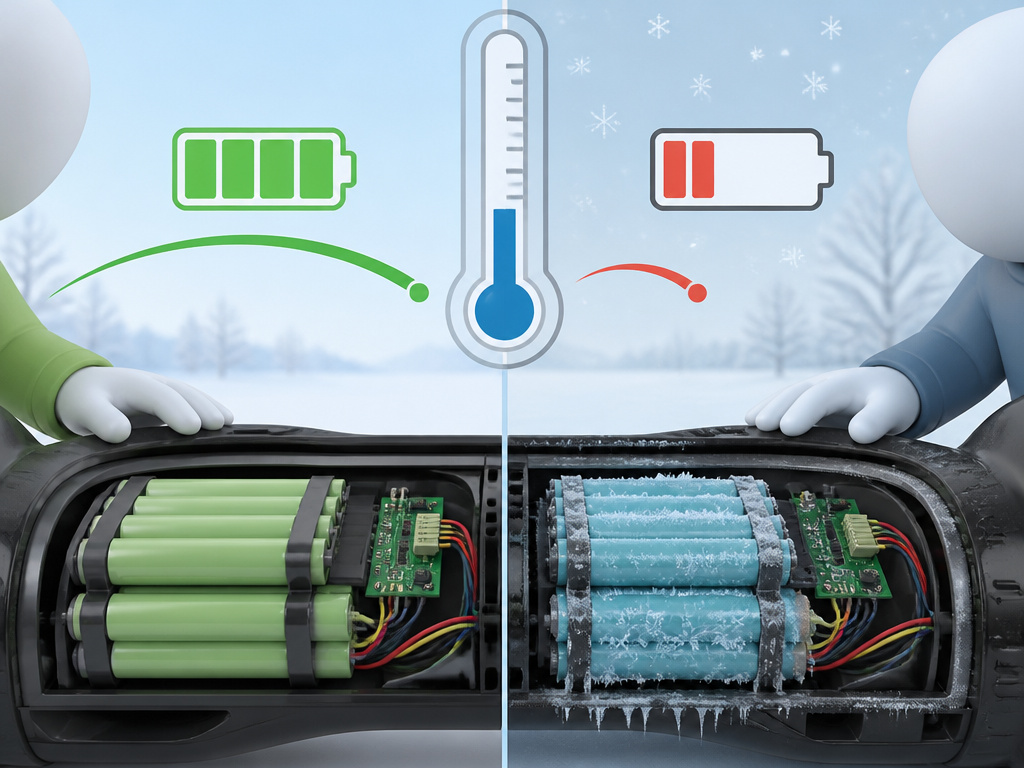
You can do everything right with charging and still watch your range plummet if you ignore the thermometer. Temperature affects both performance and safety, and manuals are very specific about the limits.
The Gyroor Y1S manual quantifies the penalty: range can be halved at -4°F (-20°C) compared to a comfortable 70°F room. The battery chemistry simply can’t deliver its full potential in the cold.
Why the disagreement? Different battery cells and BMS designs have slightly different tolerances. The rule is simple: find your manual’s stated range and stick to it. Charging a cold battery can lead to lithium plating, a permanent, dangerous buildup inside the cell that reduces capacity and increases the risk of failure.
Common mistake: Bringing a cold hoverboard from the garage straight onto the charger. The Denver manual advises letting the product cool down for one hour before charging after use; the same logic applies to warming it up. Let the board sit at room temperature for a few hours before you plug it in.
This isn’t scare talk. A federal CPSC hoverboard safety report investigated fire hazards from thermal runaway in multi-cell packs. While focused on failure propagation, the underlying cause is often cell damage from improper use, including charging outside safe temperatures.
Storage: The Great Manufacturer Disagreement
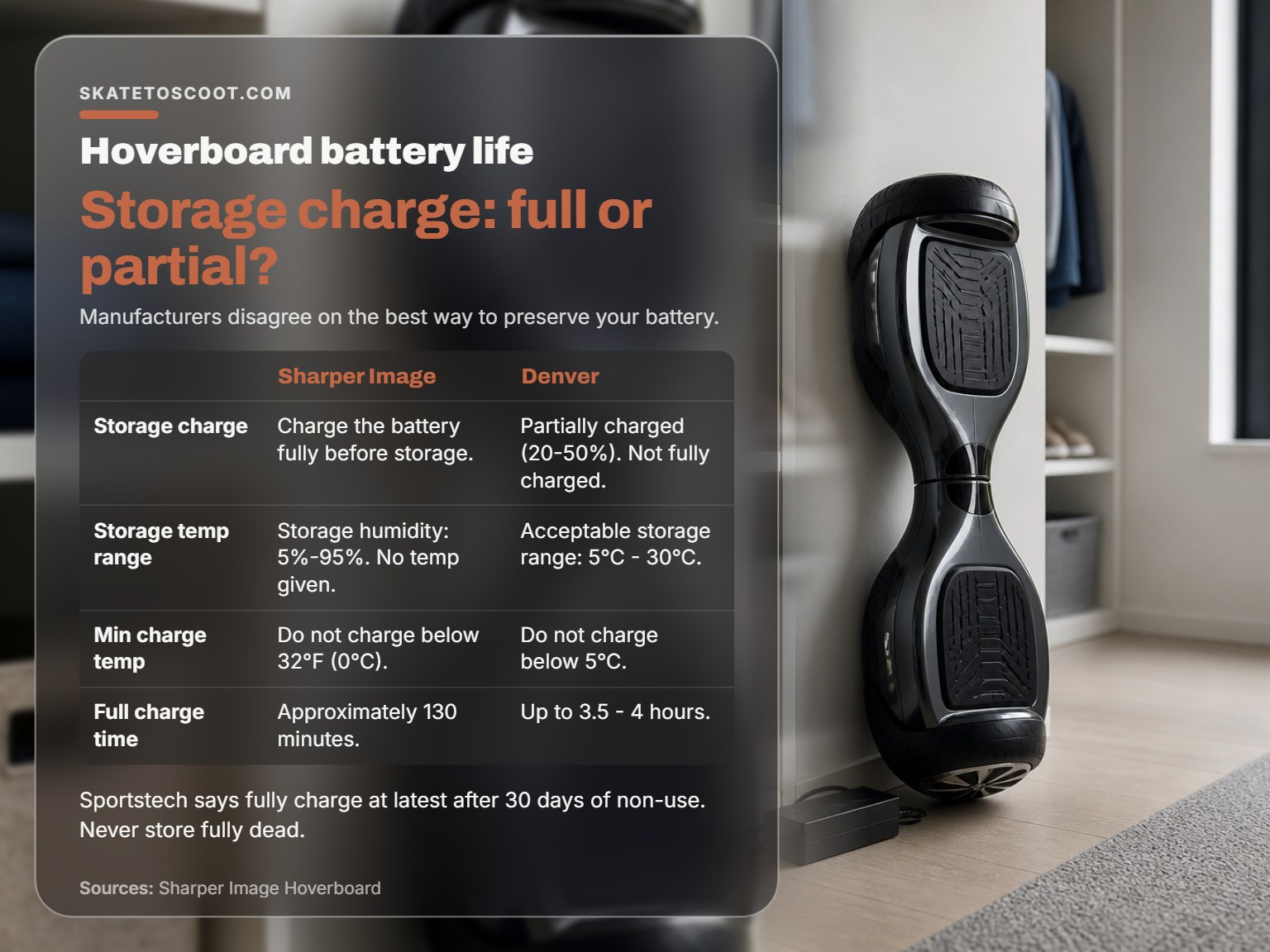
You won’t ride every day. What you do with your hoverboard between those rides, especially over winter, directly impacts how many of those 500 charge cycles you’ll actually get.
Here’s where the official advice splits into two camps. This table lays out the conflict clearly:
| Manufacturer / Model | Recommended Storage Charge Level | Source |
|---|---|---|
| Sharper Image (204257) | Charge the battery fully before storage. | Owner’s Manual |
| Sportstech Bluewheel | A battery can self-discharge and must be fully charged at latest after 30 days of non-use. | Safety Notice |
| Denver HBO-6620 | If left during a holiday period, it should be partially charged (20-50% charged). Not fully charged. | User Manual |
The Sharper Image and Sportstech stance is practical: a full charge ensures the board is ready to ride and minimizes the chance of it self-discharging to a damagingly low level before you check it again. The Denver position aligns with general lithium-ion wisdom: storing at a partial charge (around 50%) reduces stress on the cells, which can extend their long-term health.
Who’s right? Both, for their own reasons. If you store it for a month or less and want it ready to go, follow Sharper Image. If it’s going into the closet for an entire season, the Denver method is gentler on the battery. The critical universal rule is: never store it fully dead. The Gyroor manual warns that completely draining the battery may cause permanent damage.
This is a key part of understanding your Jetson hoverboard battery or any other brand’s lifespan. Check your specific manual. If it doesn’t say, a compromise is to store at 50-60% charge in a cool, dry place (between 5°C and 30°C per Denver’s “acceptable range”), and plug it in for a top-up every 30 days if you follow the Sportstech logic.
Diagnosing a Sudden Battery Life Drop
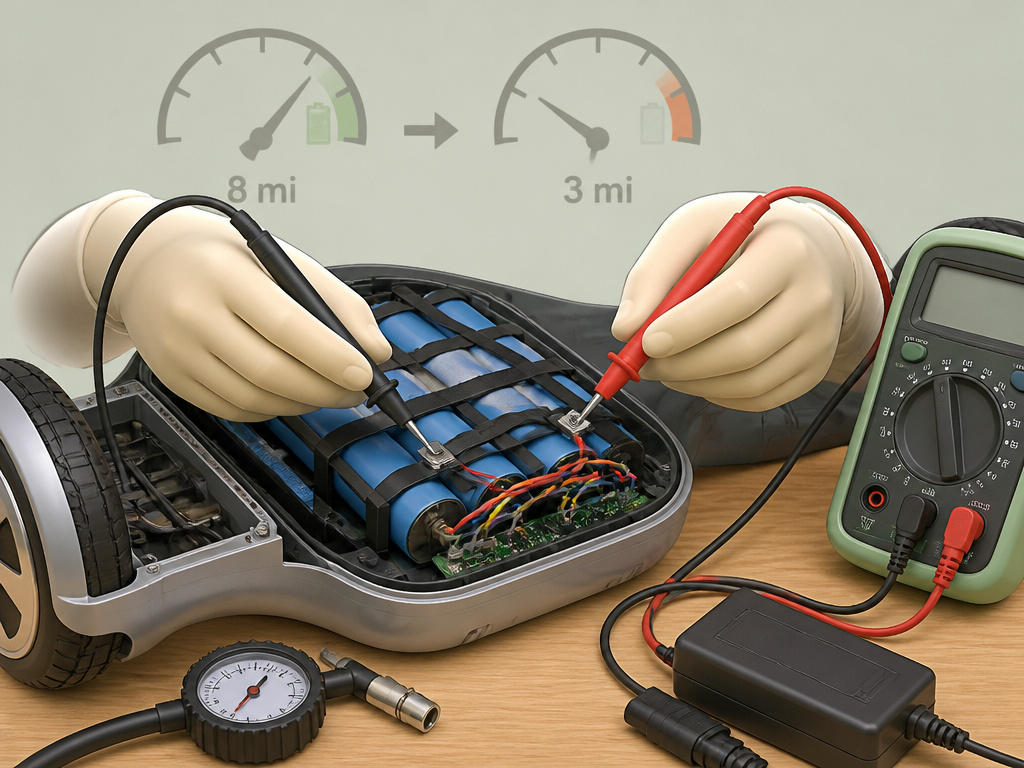
Your hoverboard used to get eight miles, now it gets three. The problem might not be a worn-out battery needing replacement. Before you buy a new pack, run through this diagnostic checklist.
First, rule out the simple stuff. Check tire pressure. Soft tires create more rolling resistance. Is a brake pad rubbing? Listen for a faint scraping sound when spinning the wheels by hand. Have you gained weight or started riding on a rougher route? These can subtly cut range over time.
Next, listen and feel. Does one motor sound strained or whine differently than the other? A failing motor draws excessive current, starving the battery. Feel the motor hubs after a short ride. One significantly hotter than the other points to a mechanical or electrical fault.
Finally, examine the charge cycle. Are you using the correct charger? Has the board been left in a car in extreme heat or cold? Have you repeatedly drained it to 0%? These abuses damage cells. If the board dies suddenly instead of giving the low-battery warning, the BMS might be faulty, causing inaccurate readings.
If all else checks out, the battery itself is likely aging or has a weak cell group. This is where knowing how to fix a hoverboard overlaps with knowing when to replace. A professional with a voltmeter can test individual cell groups within the pack to confirm.
Charging Practices That Extend (or Shorten) Life
Charging is where you have the most control over the battery’s destiny. It’s not just plugging in; it’s a series of small decisions that add up.
- Charge after every ride. The Jetson Stereofly user guide states plainly: “Timely battery charging after every ride will prolong battery life.” This avoids deep discharges.
- Use only the supplied charger. A mismatched charger can deliver the wrong voltage or current, damaging the BMS and cells.
- Unplug when full. The Denver HBO-6620 manual is adamant: disconnect the charger when the battery is fully charged. Modern chargers usually stop feeding current, but residual heat and voltage stress the pack.
- Let it cool. Don’t charge immediately after a long, hard ride. Let the battery and motors cool down for an hour, as the Denver manual suggests.
- Charge in a safe place. The Denver manual also specifies an open, dry area away from flammable materials, and not in sunlight or near open fire. This is basic fire safety for any lithium-ion device.
What shortens life? The opposites: constantly draining to 0%, leaving it plugged in for days, charging in extreme temperatures, and using a fast charger not designed for your model. These habits are what turn a 500-cycle battery into a 300-cycle battery. For the best battery life from the start, treat charging as a deliberate part of your hoverboard care tips, not an afterthought.
Frequently Asked Questions
What is the average lifespan of a hoverboard?
The functional lifespan depends heavily on the quality of its components and how well it’s maintained. This depends heavily on the quality of its components (especially the UL-certified battery) and how well it’s maintained. The battery itself is rated for a certain number of full charge cycles, which can translate to several years of typical riding before its capacity noticeably drops.
How much does it cost to replace a hoverboard battery?
Genuine OEM replacement battery pack cost varies by model and its capacity. Professional installation adds labor costs. It’s often a cost-effective way to extend the life of a hoverboard with a structurally sound frame and motors, compared to the price of a brand-new unit.
How long do hoverboards last on a full charge?
On a full charge, most hoverboards last between 6 and 12 miles, which equates to roughly 1 to 2 hours of continuous riding. Specific models like the Sharper Image Hoverboard 204257 are rated for up to 12 miles. Real-world range is always less due to rider weight, terrain, speed, and temperature.
Can you replace batteries in hoverboards?
Yes, the battery in most hoverboards is a user-replaceable component. The process involves opening the chassis, disconnecting the old battery pack, and installing a new one that matches your model’s voltage and connector. It requires basic tools and careful attention to safety when handling lithium-ion batteries.
The Bottom Line
A hoverboard’s lifespan is a negotiation between its engineering and your habits. You can’t change its factory specs, but you control the weight it carries, the hills you climb, and how you plug it in.
For a typical rider, the actual service life and range depend on the model, usage, and maintenance, which defines how long do hoverboards last. That assumes you follow the core rules: avoid deep discharges, unplug when full, and store it properly.
The data shows cold is a bigger enemy than most people think. Riding below freezing might work, but your range will suffer dramatically. Charging in the cold is prohibited below certain temperatures, which vary by model.
Finally, the manuals disagree on storage charge level for a reason. It’s a trade-off between readiness and battery stress. For seasonal storage, I side with the Denver manual’s 20-50% charge advice, it’s gentler on the chemistry. For a board you’ll use next weekend, a full charge is fine. Knowing your specific model’s manual is the essential final step. Everything else is general advice; that sheet of paper has your board’s actual numbers.