Session Skate Sim Review: Is It Worth It?
This post contains affiliate links. As an Amazon Associate, we earn from qualifying purchases.
Session: Skate Sim is a hardcore, physics-based skateboarding simulation that uses a unique dual-stick control scheme, where each thumbstick represents one of the skater’s feet. It demands patience, offers deep customization with real skate brands, and runs on modest PC hardware, but its steep learning curve, mixed visual presentation, and ongoing bug fixes make it a divisive title best suited for simulation purists rather than casual players.
If you’ve skated in real life, that sentence makes immediate sense. Your brain already knows the footwork. For everyone else, it reads like a foreign language. That gap is the entire game, a concept central to any session skate sim review.
This session skate sim review walks through what Session actually delivers: the punishing but rewarding control scheme, the real-world spots you can skate, the post-launch updates that have changed the game, and the one platform where you should avoid it. We’ll compare it to the obvious alternatives and give you the settings that make it playable.
Key Takeaways
- The dual-stick control scheme is mandatory and has a brutal learning curve, but mapping sticks to front/back foot in the options makes it far more intuitive for new players.
- Post-launch support is active, with major free updates like the FLOW release adding Goofy Stance and friction tuning, but the developer has publicly walked back earlier roadmap promises.
- The game is not even playable without a controller according to reviewers, and performance is best on PC or last-gen consoles; the Nintendo Switch port suffers significant visual downgrades.
- With a Top Critic Average of 66 on OpenCritic and 91% positive recent Steam reviews, reception is split between critics citing bugs and mission design, and players praising its simulation depth.
- The included video editor and Object Dropper tools are powerful for content creation, directly supporting the game’s focus on filming lines, not just scoring points.
The Dual-Stick Control System & The Learning Curve
Technical Snippet: In Session: Skate Sim, the dual-stick control system maps each analog stick to a corresponding skater’s foot. An ollie requires holding down the right stick (to crouch) and flicking the left stick upwards (to pop). Turning is handled by the left and right triggers, independent of the sticks used for tricks. This system is designed to simulate weight transfer and foot placement with a high degree of physical fidelity.
The first hour feels like trying to pat your head and rub your stomach while riding a unicycle. Your thumbs are your feet. The right trigger turns your shoulders right, the left trigger turns them left. An ollie, the most basic trick, needs you to hold one stick down, then flick the other up, all while managing speed with the face buttons.
I spent my first session, pun intended, constantly bailing on flat ground. The game warns you about this. A menu screen literally says, “Session is a hard game and will test your patience.” It’s not being cute. It’s stating a design principle.
Where this goes sideways: Trying to use the default “Left Foot/Right Foot” stick mapping while learning switch stance. Your brain has to flip the entire control scheme mentally. This cooks your neural pathways. The fix is in the gameplay options: change the stick mapping to “Front Foot/Back Foot.” Now your front foot is always on one stick, your back foot on the other, regardless of whether you’re riding regular or goofy. This one setting cuts the initial learning time in half.
The reason the controls feel so alien, yet so praised by real skaters, is the why-layer. In a real ollie, you slam your back foot down on the tail while sliding your front foot up the board. The game mimics that physical sequence directly. When it clicks, you’re not pressing buttons; you’re timing a weight transfer. That’s the reward. But you have to want it.
| Control Element | Function | Why It’s Tough |
|---|---|---|
| Left Thumbstick | Controls front foot (if set to Front/Back) for flip tricks, pops, and grinds. | Must be coordinated independently from the right stick while managing speed and turn. |
| Right Thumbstick | Controls back foot for pops, scooping for spins, and adjusting grinds. | Precision is key; slight wrong angles cause failed tricks or unexpected rotations. |
| Left Trigger (L2/LT) | Turns skater left. | Disconnected from the turning you’re used to with a left stick. |
| Right Trigger (R2/RT) | Turns skater right. | Requires re-wiring years of gaming muscle memory. |
| Face Buttons (X/A, Square/B) | Push buttons for acceleration (one for each foot). | Forgetting to push means no speed; pushing too much means crashing. |
Realism, Physics & The Comparison to Skate. And Skater XL
This isn’t Skate 4. If you come in expecting the fluid, forgiving arcade-sim hybrid of EA’s series, you’ll leave frustrated. Session sits on the far opposite end of the spectrum from Tony Hawk’s Pro Skater. Its closest relative is Skater XL, but even that comparison is flawed.
Skater XL also uses a dual-stick system, but its physics are often described as “floaty” and its vanilla content at launch was threadbare. Session’s physics are heavier, with a more pronounced sense of gravity and board friction. The developer’s FLOW release updated this further, tweaking the “Flow & Friction” to make grinds and slides feel more sticky and predictable. It’s a sim that tries to account for wheel hardness, truck tightness, and board wear.
The part nobody mentions: The lack of grab tricks. You can’t reach down and grab the board. For some, this kills the fantasy of replicating their favorite vert or street videos. For the developers, it was a deliberate choice to focus purely on street skating footwork. It’s a trade-off that defines the game’s scope.
So, which should you play? The choice is about your goal.
- Play Session: Skate Sim if you want a deep, unforgiving practice simulator where nailing a clean kickflip down a three-stair feels like a real achievement. It’s for the player who enjoys the process as much as the result.
- Play Skater XL if you prefer slightly more accessible physics, a thriving mod scene on PC, and don’t mind a bare-bones base game.
- Wait for Skate. (or replay Skate 3) if you want a polished, campaign-driven experience that balances challenge with fun.
The community split is clear. Check any forum and you’ll find players who bounced off Session but love Skater XL for its flow, and vice-versa, a dynamic central to any session skate sim review. It’s the dark roast vs. Light roast debate of skate sims.
Graphics, Performance & The Switch Port
Here’s where sources disagree. One critic calls the visuals “barebones at best and dated beyond belief at worst.” Another, reviewing the Switch port, says it’s a “pretty faithful representation of the game on other platforms,” implying the base game’s graphics are acceptable.
On a decent PC or a PlayStation 5, Session is not a looker. The textures are often flat, the lighting can be harsh, and the world is static. Cars don’t move. The cardboard boxes are glued to the floor. But it runs smoothly. The recommended specs are a Intel Core i7-4790 or AMD Ryzen 5 2600 with a NVIDIA GeForce GTX 970, 4 GB or AMD Radeon RX 480, 4 GB. The game demands 15 GB of storage and 8 GB of RAM for its minimum requirements. It’s not taxing your system to deliver breathtaking vistas; it’s reserving resources for the physics engine.
The Nintendo Switch version is a different story. It’s the same game, but the visual downgrade is severe. Draw distances shrink, textures become muddy, and the frame rate can chug in dense areas like San Francisco. Pixelbandits gave this port a 6/10, noting the visuals “have really hampered the score here making it hard to see where you’re going.” It’s a functional, portable version of Session, but it’s the worst way to play it.
Common mistake: Buying the Switch port for its portability without understanding the visual compromise. If you have any other platform, get it there. The Steam Deck, however, is a great middle ground, the developer confirmed full compatibility, and it runs well on Valve’s handheld.
The sound design escapes most criticism. The clack of the board on concrete, the hiss of a powerslide, the specific click of a truck locking into a grind, it’s all meticulously crafted. It’s the main sensory layer that sells the realism when the graphics might not.
Maps, Customization & The Video Editor
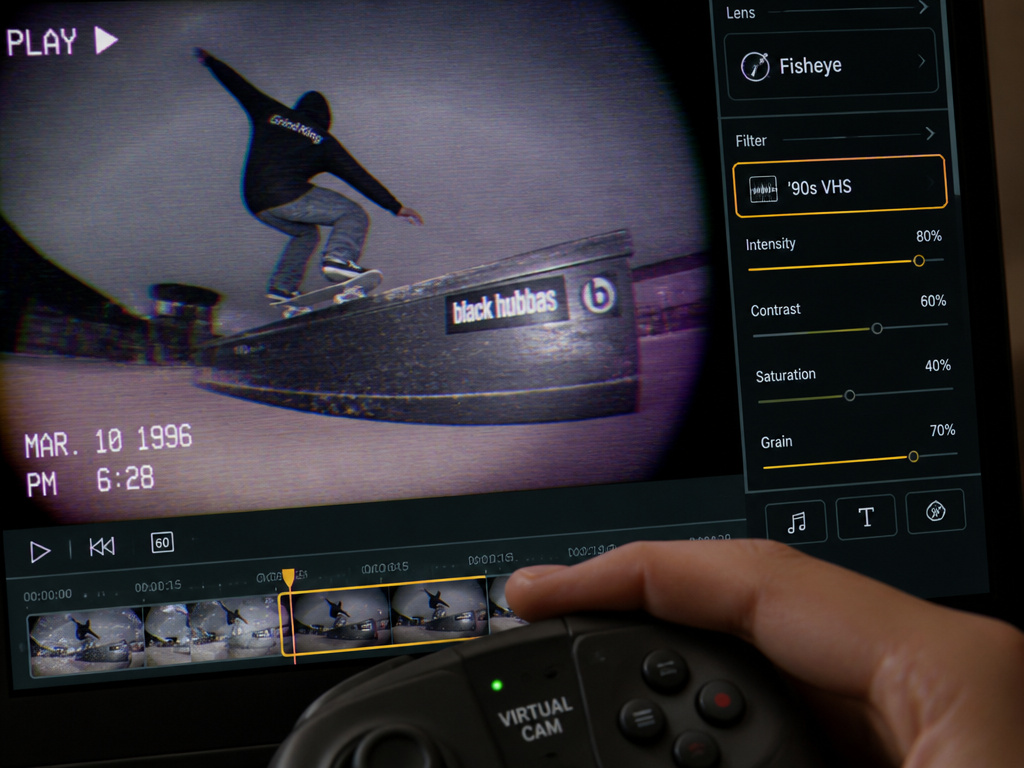
You’ll spend your time across fictionalized versions of New York, Philadelphia, and San Francisco, hitting real-world iconic spots like Black Hubbas, Brooklyn banks, and FDR Park. You find a spot, try a line, fail, respawn, and try again. That’s the core loop.
Progression comes through a light “story mode” of challenges from guest pro skaters. The missions are often poorly explained, leading to trial-and-error frustration. Most players I know, including myself, eventually ignore them and just skate. The game truly shines as a digital skatepark for your own creativity.
Customization is a major strength. The game features nearly 200 clothing items from brands like Fallen, Zero, and GrindKing, and over 250 skateboard parts from No-Comply and others. I couldn’t feel a dramatic difference, but the illusion of tuning your setup adds to the role-playing.
The video editor is arguably the game’s most polished feature. It’s a full suite of tools for creating skate videos, with options for field of view, fisheye lenses, 1990s filters, tripod cams, and orbit cams. You can edit clip length, speed, and add markers. For someone who wants to produce slick edit videos of their lines, it’s a powerful and surprisingly deep system baked right into the game. It directly enables the community aspect, you skate to film the clip, then share it.
Post-Launch Support, Mods & The Roadmap
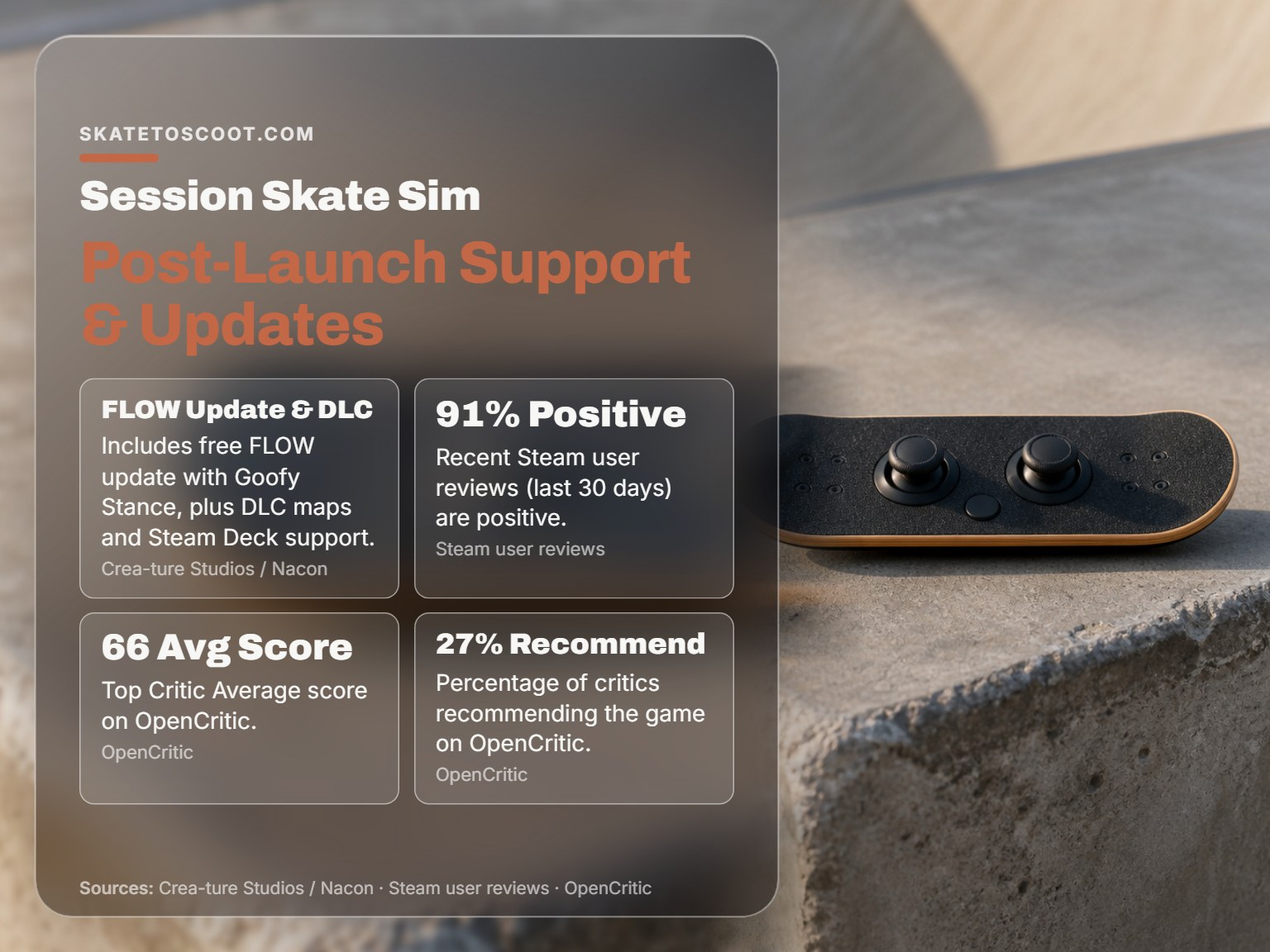
This is where Session separates itself from its troubled competitor, Skater XL. Developer Crea-ture Studios has been consistently updating the game since its 1.0 launch in September 2022. The FLOW release was a major free update that added Goofy Stance (finally), a physics pass on flow and friction, and new clothing.
However, managing expectations is crucial. They apologized for the frustration. This honesty is refreshing but tells you the original vision has been scaled back.
You can find custom maps and gear online, but it requires more tinkering. The game’s focus remains on its official DLC and updates.
| Update/DLC | Key Additions | Platform | Note |
|---|---|---|---|
| FLOW Release (Free) | Goofy Stance, Flow & Friction physics tuning, new socks & gear. | All | Major gameplay update addressing core physics. |
| Paris DLC | New map, Object Dropper assets. | All | Paid expansion. |
| Barcelona DLC | New map, 7 new Object Dropper items. | All | Paid expansion; released with roadmap reset announcement. |
| Steam Deck Support | Full compatibility verified. | PC/Steam Deck | Quality of life update for portable play. |
Is Session: Skate Sim Worth Buying?
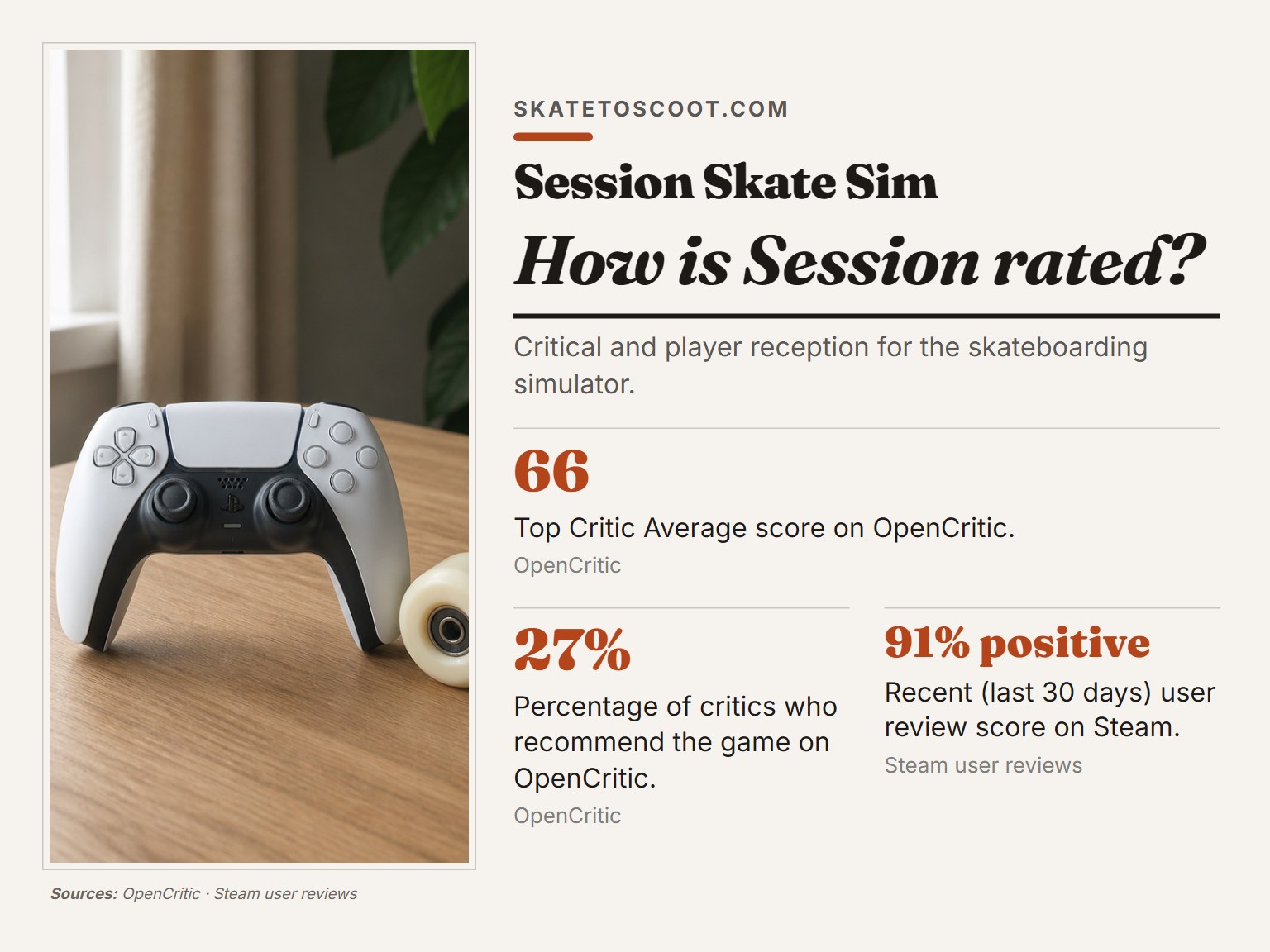
With a base price of $39.99, a Top Critic Average of 66 on OpenCritic, and 91% positive recent Steam reviews, the value proposition is personal. Players praise the unparalleled simulation feel, the deep customization, and the satisfying control mastery.
Here is the thing. Session isn’t trying to be for everyone. It’s a simulator. You play it to engage, to struggle, and to eventually triumph over its systems.
Before you buy, ask yourself:
- Do I own a controller? It’s not optional. One review states it’s “not even playable without one.”
- Am I patient? The initial learning period involves frequent falling.
- Do I want to make my own fun? The campaign is weak. The joy is in finding and filming your own lines.
If you answered yes, and you’re on PC or a modern console, Session offers a unique, hardcore experience that no other game replicates. It’s the definitive sim for street skating purists. If you’re on the fence, wishlist it and grab it on sale.
How to do grab tricks in Session
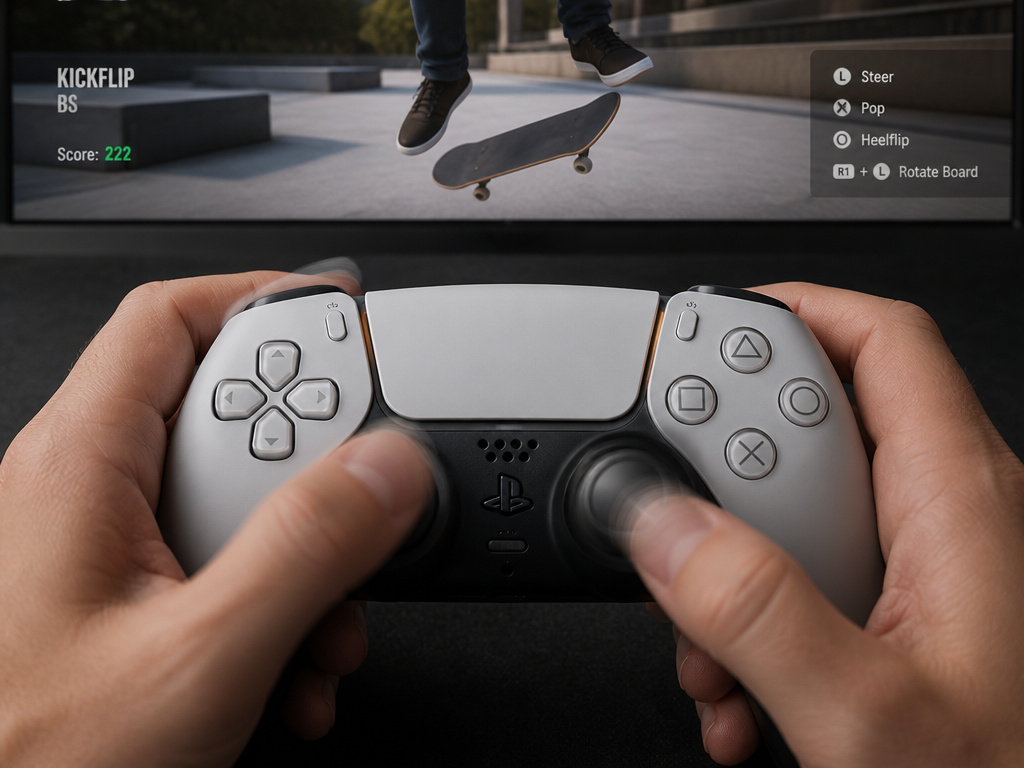
You won’t find them. The game’s dual stick control system is built entirely around foot-based flip and grind tricks. This is a deliberate design choice to simulate a specific style of street skating, where grabs are less common. The focus is on using each thumbstick to represent the precise foot movement for kickflips, heelflips, and board slides. For players used to other skate games, this means adjusting your expectations. The challenge and satisfaction come from mastering the intricate stick motions for technical ground tricks, not from grabbing the board in the air.
Is Session Skate Sim too hard?
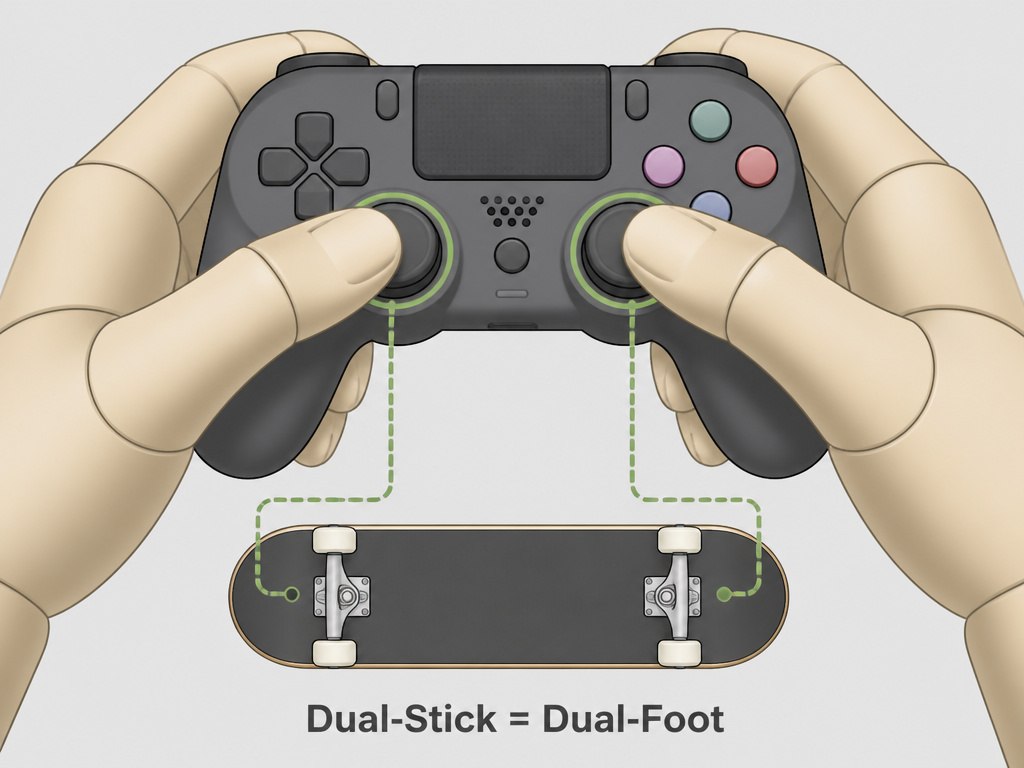
The game is upfront about its challenge. It offers four difficulty levels to help you find your footing. These settings adjust how forgiving the trick detection and landing physics are, acting as a crucial training wheel system. Starting on the easiest setting is a practical way to internalize the unique dual-stick controls where each stick is a foot. As you build muscle memory, you can ramp up the difficulty for a more authentic and demanding simulation. The game is not even playable without a controller, so getting comfortable with that is your first essential step.
Session physics bugs and trick detection
These bugs can break immersion and frustrate a run. The game’s complex simulation can sometimes produce unexpected bails or shaky landings that feel unfair. When this happens, a practical approach is to adjust your timing slightly or try the trick from a different angle, as the detection system can be particular.
Frequently Asked Questions
Is Session: Skate Sim any good?
It’s excellent at what it sets out to be: a hardcore, physics-based street skateboarding simulator. Its dual-stick controls are uniquely rewarding to master, and the video editor and customization are deep. However, its steep learning curve, dated graphics, and sometimes frustrating mission design mean “good” is entirely dependent on your appetite for simulation over arcade fun.
Are they still working on Session: Skate Sim?
Yes, but with adjusted expectations. Support continues with updates and DLC, but the original grand vision has been scaled back.
Is Session or Skate better?
They are fundamentally different games. Skate (and the upcoming Skate.) is a more polished, accessible arcade-simulation hybrid with a strong campaign and smoother overall feel. Session: Skate Sim is a brutal, uncompromising simulator focused on physics and realistic footwork. “Better” depends entirely on whether you want a fun video game about skating or a digital skateboarding practice tool.
Which is better, Session or Skater XL?
This is the real debate. Session has more official content (maps, gear, a video editor) and heavier, more realistic physics out of the box. Skater XL has more fluid, “floaty” physics and a massive, easy-to-install mod scene on PC that can tailor the experience to your exact liking.
What are the system requirements for Session: Skate Sim?
The minimum specs are modest: Windows 7, an Intel Core i7-2700K or AMD FX-8370 CPU, 8 GB RAM, and an NVIDIA GeForce GTX 650 Ti 2GB or AMD Radeon R7 360 2GB GPU with 15 GB storage. The recommended specs target a smoother experience: Windows 10, an Intel Core i7-4790 or AMD Ryzen 5 2600, the same 8 GB RAM, and an NVIDIA GeForce GTX 970 4GB or AMD Radeon RX 480 4GB.
The Bottom Line
Session: Skate Sim is a niche title that found its audience. It doesn’t apologize for its difficulty, and its recent updates show a developer still committed to refining its unique vision, even if that vision is now more focused. The 91% recent Steam rating tells the real story: the players who click with it, love it deeply.
For the right person, a skater wanting to practice digitally, a simulation enthusiast, or a content creator wanting a robust video editor, it’s an easy recommendation. For everyone else, the warning on the menu is there for a reason. It will test your patience. The question is whether you think passing that test is worth the price of admission.
If you do dive in, start in the options menu. Change the stick mapping to front/back foot, tweak the pop height if you need to, and give yourself permission to ignore the missions. Find a curb you like and just try to boardslide it. That’s where Session lives. Not in the scores or the story, but in the quiet satisfaction of a trick you finally nailed after two dozen tries. No other game gives you that feeling quite the same way.