iScooter i9 Review: Key Takeaways and Specs
This post contains affiliate links. As an Amazon Associate, we earn from qualifying purchases.
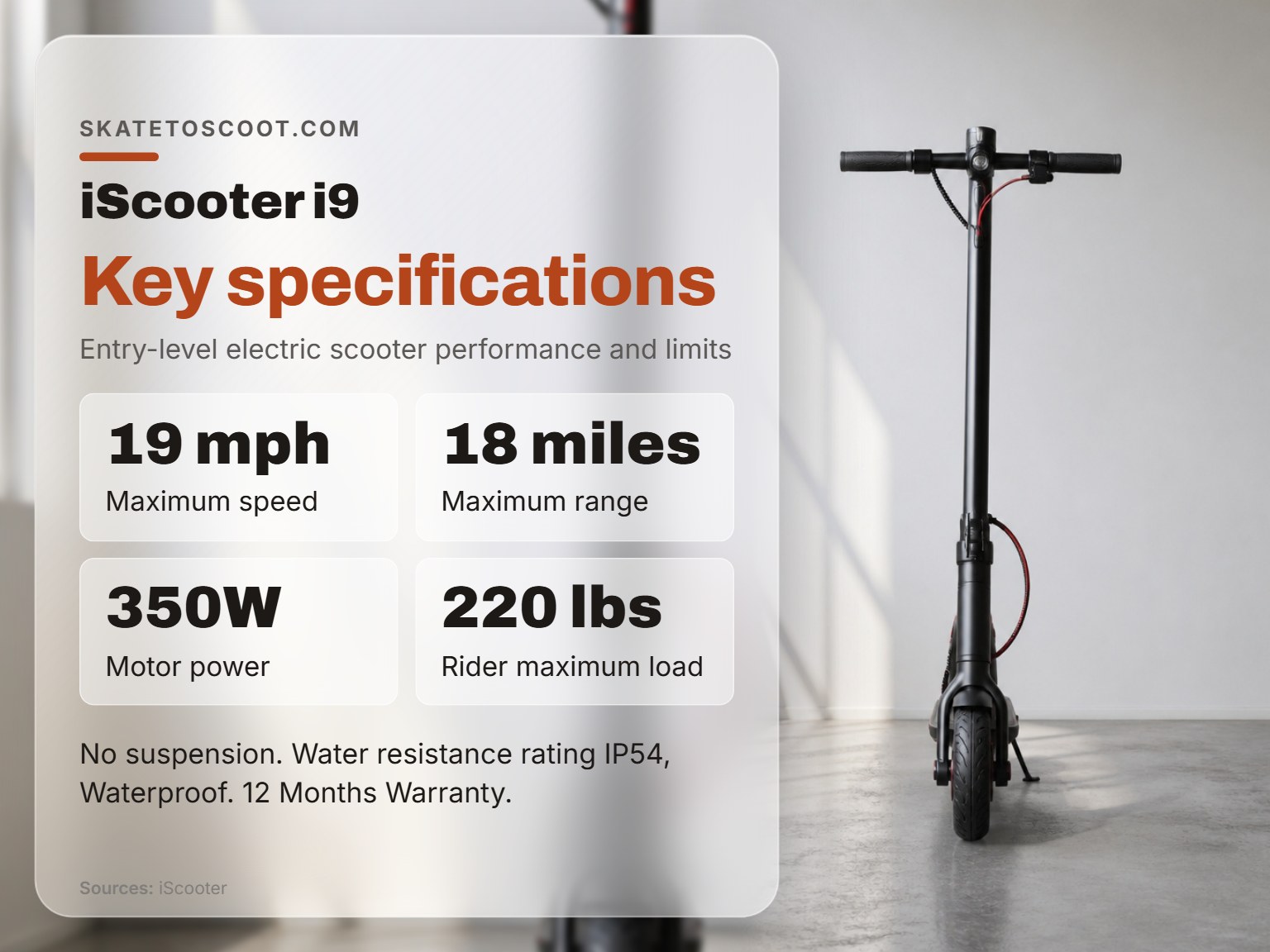
The iScooter i9 is a 24.3 lb, foldable electric scooter with a 350W motor and solid honeycomb tires, offering a top speed of 19 mph and a manufacturer-rated range of 18 miles. Its lack of suspension and front-wheel-drive setup make it best suited for smooth pavement and lighter riders looking for a simple, portable commuter.
That range figure is the one every spec sheet leads with. It’s also the first number that disappoints new owners who don’t check their weight against the scooter’s 220 lb (100 kg) maximum load. The difference between advertised and real-world mileage isn’t a secret; it’s simple physics.
What follows is a breakdown of the specs that matter, the performance you can actually expect from an iscooter i9 review, and the common issues that pop up after a few months of daily use. By the end, you’ll know whether the i9 is the right entry point or if you should step up to another model in the iScooter lineup.
Key Takeaways
- The i9’s 18-mile range is a best-case lab figure. Expect less than the advertised 18-mile range with hills or extra weight.
- Check your package contents immediately. The i9 ships with 1 Allen wrench, 4 screws, and 1 charger. If anything is missing, email
[email protected]with a photo. - Error codes E04 through E16 mean “contact support”. The manual lists these for short circuits, sensor failures, and brake issues, but provides no user fixes.
- The rear disc brake often needs adjustment. A common complaint is weak braking or a rubbing noise from the rear wheel, which usually means the disc is tilted.
- For hilly terrain or riders near the maximum load, consider the iScooter i10 or i12. Their more powerful motors handle inclines better.
The iScooter i9 Spec Sheet (At a Glance)
Before we get into the ride feel, here are the official numbers. Keep in mind that the manual and the official website disagree on a few key specs, which we’ll address in the next section.
| Category | Official Spec (iscooterglobal.com) | Manual Spec (PDF) | What It Means for You |
|---|---|---|---|
| Motor Power | 350W | 350W | Adequate for flat commutes; struggles on steep hills. |
| Max Speed | 19 mph (30 km/h) | 19 mph (30 km/h) | Governed by two speed modes; realistic top speed. |
| Max Range | 18 miles (25 km) | 18 miles (25 km) | Best-case scenario. Real-world is less. |
| Battery | 36V 7.8Ah (iscooterglobal.com) | 36V 7.5Ah (manual) | A minor discrepancy; both indicate a modest capacity. |
| Max Load | 220 lbs (100 kg) | 220 lbs (100 kg) | The verified maximum rider load is 220 lbs. |
| Weight | 24.3 lbs (11 kg) | 24.3 lbs (11 kg) | Light enough to carry short distances when folded. |
| Tires | Honeycomb Tire (8.5″) | Honeycomb Tire (8.5″) | Puncture-proof but give a firm, bumpy ride. |
| Suspension | None | None | Every bump travels straight to your feet and knees. |
| IP Rating | IP54, Waterproof | IP54 | Protected from water splashes, not submersion. |
Where this goes sideways: Trusting the higher weight limit from the manual. The official product page is the definitive source, and exceeding 220 lbs risks premature motor wear and frame stress.
Performance & Real-World Ride: Where the Specs Meet the Pavement
A 350W motor pushing a scooter to 19 mph sounds fine on paper. On asphalt, you feel the difference between adequate and powerful. The i9 is front-wheel drive, which is common for budget scooters. The traction is fine on dry, smooth surfaces, but you lose a bit of punch on wet pavement or loose gravel.
Real-World Range: Expect 12-15 Miles, Not 18
The advertised 18-mile range in an iscooter i9 review assumes a light rider on perfectly flat ground at a steady, moderate speed. In practice, three things cut into that number: rider weight, hills, and stop-and-go traffic.
A 160 lb rider on a flat bike path might see 15 miles. Add a backpack, a few gentle inclines, and some acceleration from stoplights, and that drops to 12-13 miles. If you’re closer to the 220 lb max load, plan for a significantly reduced range. The battery gauge on the LED display is not linear; the last bar disappears faster than the first.
The part nobody mentions: The i9’s battery charges in 5-6 hours. If your commute is 7 miles each way, you’ll need a full recharge every day to avoid the anxiety of a dead scooter on the return trip.
Hill Climb: It’s a Grind, Not a Glide
The 350W motor will get you up a slope, but it won’t be quick. On a moderate hill, the scooter will slow considerably. You’ll hear the motor whine, a high-pitched electric hum that tells you it’s working at its limit. For a city with serious hills, this is the scooter’s biggest weakness.
This is where stepping up to an iScooter i10 or an iScooter i12 makes immediate sense. Their 500W and 800W motors, respectively, turn a hill climb from a grind back into a commute.
Ride Comfort: You Are the Suspension
With no shock absorbers and solid honeycomb tires, the i9 transmits every crack and pebble directly through the deck. Your knees and ankles become the primary suspension system. After a 20-minute ride on rough pavement, you’ll feel it.
The foam handlebar grips help dampen some vibration, but the solid tires are the main culprit. They trade the puncture risk of air-filled tires for a permanently firm ride. For perfectly smooth bike lanes, it’s acceptable. For typical city streets with patches and cracks, it’s a significant comfort compromise.
Build Quality, Portability & Daily Use
The i9 feels solid for its price point. The stem locks firmly into place, and the folding mechanism, hook the stem to a buckle on the rear fender, is simple and reliable. At 24.3 lbs, it’s light enough to carry up a flight of stairs or onto a bus, which is a key feature for last-mile commuting.
The Folding Process: Simple, But Mind the Bell
To fold, you release the lever, bend the handlebar stem down, and hook it onto the buckle on the rear fender. To open, you press the bell trigger to release it from the buckle, lift the stem, and lock the lever. It takes ten seconds.
Common mistake: Forcing the stem onto the fender buckle. It should hook on easily. If you’re applying real pressure, the mechanism isn’t fully unlocked or the stem isn’t aligned. Forcing it can crack the plastic fender.
The Included Tools & Initial Setup
Your box should contain the scooter, one Allen wrench, four screws, and a charger. The screws are for securing the handlebar to the stem, a step you must complete before your first ride. The provided Allen wrench is the only tool you’ll get for basic maintenance.
If any of these are missing, iScooter’s manual is clear: take a photo and email [email protected]. Don’t try to ride with a loose handlebar. It’s a five-minute check that prevents a catastrophic failure.
Troubleshooting: Error Codes, Brakes, and Getting Support
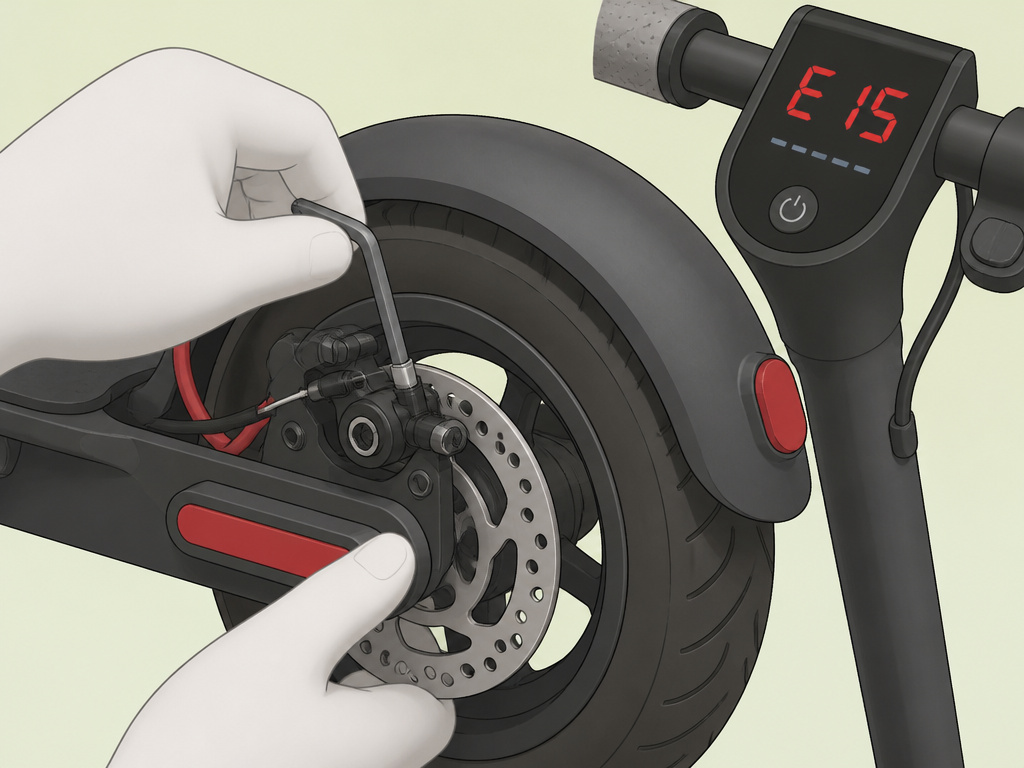
This is where the i9’s budget nature shows most clearly. The manual lists specific error codes but offers no user troubleshooting. The advice is always to contact support.
Understanding the Error Codes
The display might show codes like E04 (Short Circuit) or E10-E16 (communication and sensor failures). These indicate internal electrical faults.
E15 Brake Failure or E16 Motor Hall Failure are the ones that will stop you dead. The manual’s instruction is the same for all: “Please contact iScooter Support Team to remove the error code.”
You can’t clear them yourself. Your path forward is customer support. This reliance on external help is the trade-off highlighted in every iscooter i9 review for the i9’s lower upfront cost.
The Squeaky or Weak Rear Brake Fix
A frequent owner complaint is a rubbing noise from the rear wheel or a brake lever that goes to the handlebar without much effect. The manual acknowledges this: “It usually means your disc brake tilt and cause friction noise.”
The official advice is to see the “Disc Brake Adjustment” page in the manual or search YouTube for “How to adjust rear brake of scooter.” In practice, it’s a simple alignment fix you can do with the included Allen wrench. It’s a five-minute job that saves a support ticket. The fact that it’s so common, yet not covered in detail in the manual, tells you where iScooter’s priorities lie.
Customer Service Channels
IScooter offers a 12-month warranty and 30-day return policy. Support is primarily email-based:
- Global/US:
[email protected]or+1 (855) 916-2366 - UK:
[email protected]or+44 1888 785356
Response times vary. Having your order number and a clear photo of any problem ready will speed things up. For complex electrical issues like error codes, you’ll likely be dealing with them for a while.
iScooter i9 vs. Other iScooter Models: Which to Choose?
The i9 is the entry point. Knowing when to step up to another model is the key to being happy with your purchase.
| Model | Motor | Max Speed | Key Upgrade Over i9 | Best For |
|---|---|---|---|---|
| i9 (This Model) | 350W | 19 mph | Baseline. | Flat commutes, light riders, tight budget. |
| iScooter i10 Max | 800W | 25 mph | Power, range, turn signals. | Riders needing more hill power and stability. |
| iScooter iX7 Pro | 800W | 28 mph | Off-road tires, suspension. | Rough paths, light trail use, much better comfort. |
| iScooter i14 | 500W (Dual) | 28 mph | Dual motors, all-wheel drive. | All-weather traction, serious hill performance. |
If your commute has hills or you are near the maximum load, skip the i9. The iScooter i10 is the logical next step. If your roads are rough, the suspension on the iScooter iX7 Pro is worth the investment to save your joints.
Long-Term Ownership & Things That Wear Out
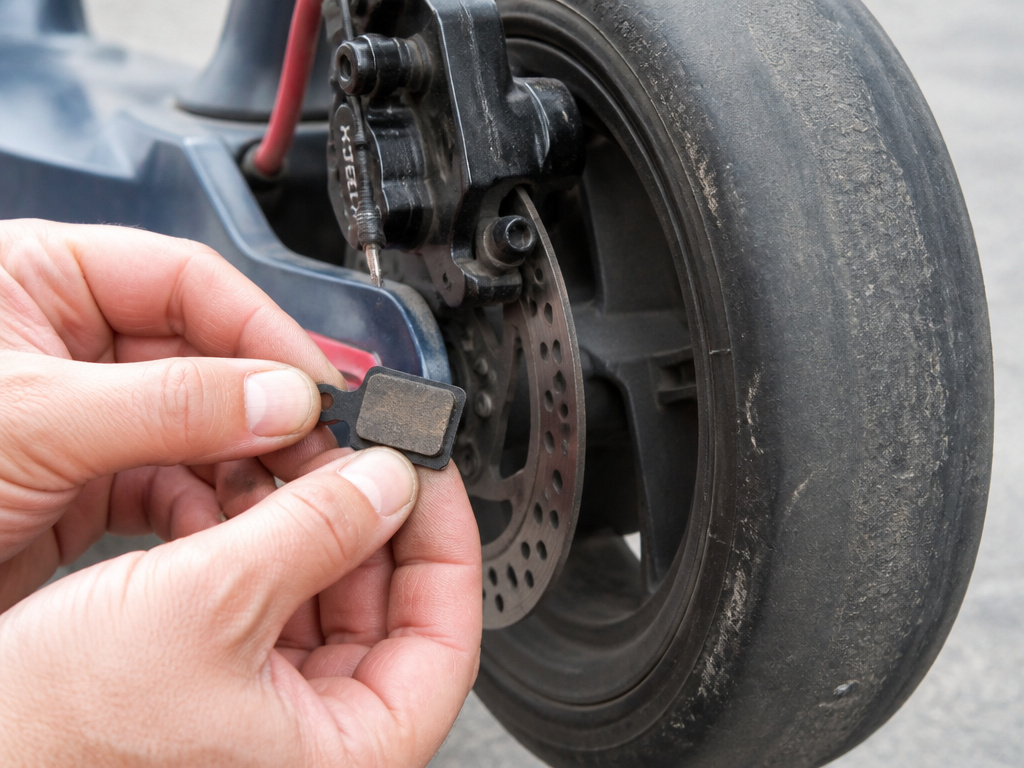
Beyond the battery slowly losing capacity over hundreds of cycles, a few components are known wear points.
The Tires: They’re solid, so they won’t puncture, but the rubber will harden and wear down over thousands of miles. Replacement is possible, the manual says to contact support or search for a YouTube video, but it’s not a simple swap like an air tire.
The Brake Pads: The rear disc brake pads will wear down with use. Listen for a persistent metal-on-metal scraping sound even after adjusting the disc alignment. That’s your sign to look into replacements.
The Folding Mechanism Latch: This metal-on-plastic latch gets used every time you fold the scooter. After a year or two of daily use, it can develop play or become harder to lock. A small dab of silicone lubricant on the moving parts once a year keeps it smooth.
Does the iScooter i9 have an app?
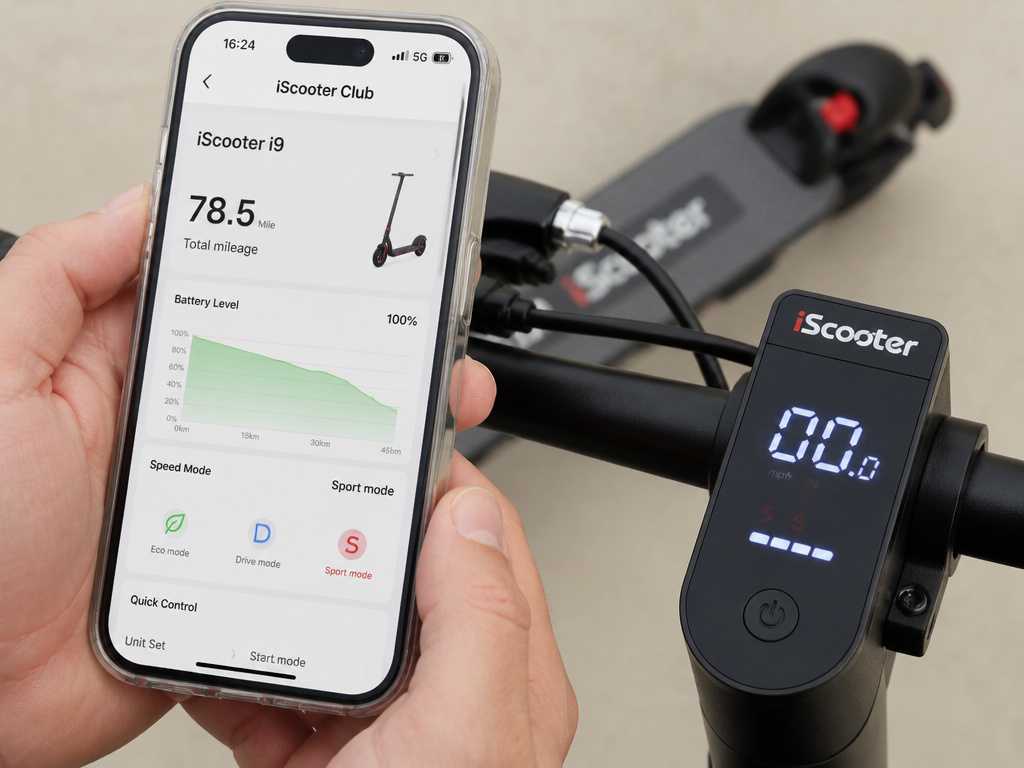
The i9 is listed as having app compatibility. The official app is called the iScooter Club App and it’s available for both iOS and Android devices. While the fact sheet confirms the app exists, it doesn’t detail the specific features you can control through it. Typically, companion apps for scooters allow you to adjust speed modes, check battery level in detail, customize lighting, and monitor your trip data. Since the i9 has a multi-functional LED display on the handlebar, the app likely provides a more detailed interface for these settings and ride statistics. For any troubleshooting related to app pairing or functionality, you would need to contact iScooter support directly.
Frequently Asked Questions
Is the iScooter i9 any good?
For its specific use case, yes. The iScooter i9 is a good, no-frills electric scooter for light riders (under 180 lbs) with short, flat commutes under 10 miles round-trip. Its solid tires eliminate punctures, and its light weight makes it highly portable. It struggles with hills and rough roads, and its real-world range is less than advertised.
How fast does the i9 iScooter go?
The iScooter i9 has a governed top speed of 19 mph (30 km/h). It has two speed modes, with the lower mode capping the speed for beginners. On a flat surface with a full battery, it will reliably hit 19 mph.
Which is better, iScooter or Segway?
This depends entirely on your budget and needs. Segway (Ninebot) models like the E-series are generally more polished, with better water resistance ratings, more refined software, and wider dealer networks for service. They are also significantly more expensive. IScooter models like the i9 offer similar basic performance at a much lower price, but you trade away some build refinement, weather sealing, and accessible support. For a tight budget, iScooter can be better value. For hassle-free ownership and better aftercare, Segway is often the better choice.
Can the iScooter i9 get wet?
The i9 has an IP54 rating, meaning it is protected against dust ingress and water splashes from any direction. It can handle light rain or wet roads. It is not waterproof and should never be submerged, ridden through deep puddles, or left out in a downpour. The manual also warns that storing it in extremely humid conditions can cause internal condensation that damages the battery.
What is the warranty on the iScooter i9?
IScooter offers a 12-month warranty on the i9, covering defects in materials and workmanship. They also have a 30-day return policy. Claims are processed through their email support ([email protected] or regional equivalents). You will need your proof of purchase.
The Bottom Line
The iScooter i9 is a competent tool for a specific job. It gets a lightweight person across flat ground reliably and folds away easily. It is not a versatile, all-condition vehicle.
Commit to it only if your daily route is smooth and your hills are gentle. If your commute involves any significant incline, or if you weigh more than 180 lbs, the motor will strain and the range will plummet. In that case, the extra investment in an iScooter i10 or even an iScooter iX4 is not an upgrade, it’s a necessity for the scooter to perform its basic function.
For the right rider, it’s a value pick. For everyone else, it’s a lesson in why the cheapest option often costs you more in frustration. Check your route, be honest about your weight, and buy accordingly.