How to Ride a Hoverboard: Step-by-Step (Without Falling)
This post contains affiliate links. As an Amazon Associate, we earn from qualifying purchases.
To ride a hoverboard, you mount it on a flat surface, let its gyroscopes self-balance, and control direction by shifting your weight forward, backward, or side-to-side. The exact method, foot twist or body lean, depends on your board’s model. The real challenge isn’t the mechanics; it’s trusting the board enough to commit your weight.
That trust gap is where most first-timers stall. You step on, feel the wheels twitch, and panic-lean back, which the board reads as a “reverse” command. Suddenly you’re scooting backwards into the furniture you were using for support. The manuals from Swagtron and HighRoller specify a critical, model-specific tilt limit at startup, usually around 10 degrees, past which the board will sound an alarm and refuse to balance. A key part of how to ride a hoverboard is understanding this limit. Miss that warning, and your first attempt ends before it begins.
What follows is the sequence that actually works, pulled from the OEM service manuals and filtered through a decade of coaching balance sports. We’ll cover the pre-ride safety non-negotiables, the precise mounting drill, the weight-shift controls, and the model-specific quirks the generic videos skip when explaining how to ride a hoverboard. You’ll also get the official hazard data, the CPSC’s tally of fires and the one rule that voids most warranties on contact.
Key Takeaways
- Always start on a perfectly flat surface; an incline over 10 degrees triggers a failure alarm on models like the HighRoller C and prevents self-balancing.
- Stop riding and recharge at the first low-battery warning; continuing can damage the battery and, on some models like the HighRoller Model C, cause the motor to cut out within 15 seconds.
- Use only the charger supplied with your board and never charge unattended, especially overnight, the CPSC is aware of more than 250 hoverboard incidents related to fires or overheating.
- Wear a skateboard helmet, knee and elbow pads, and wrist guards every time; the CPSC chairman’s official statement mandates the same gear as for skateboarding.
- Engage your board’s “learning mode” if it has one; this limits speed and sharpens response for your first few hours, a feature clearly outlined in the Swagtron T380 manual.
Before You Start: The Non-Negotiable Safety Scan
You wouldn’t step onto a skateboard without checking the trucks. A hoverboard demands the same diligence, but the checks are electrical and mechanical.
First, the certification. The U.S. Consumer Product Safety Commission (CPSC) states hoverboards should be compliant with the UL 2272 safety standard. This certification covers the entire unit, not just the battery or charger. Their alert is blunt: if you bought your board before January 29, 2016, it is not UL 2272 compliant. Never buy from a kiosk, secondhand seller, or online retailer without proof of this certification. The federal CPSC hoverboard safety alert documents the stakes: over 250 incidents related to fires, two fatal house fires in 2017, 13 burn injuries, and over $4 million in property damage.
Second, the environment. Pick a smooth, paved area clear of traffic, debris, and slopes. A driveway, empty parking lot, or long hallway is ideal. This isn’t just about comfort, it’s a functional requirement. The HighRoller Model C manual specifies that if the surface is off balance by more than 10 degrees at startup, an alarm will sound and the system cannot self-balance. The Swagtron T380 warns against riding sideways or turning on slopes because the self-balancing sensors may malfunction.
Third, your gear. This isn’t a suggestion. The CPSC chairman safety statement explicitly recommends “the same safety gear that you would wear when riding a skateboard, a skateboard helmet, and knee and elbow pads and wrist guards for protection from falls.” For a complete rundown, review our dedicated hoverboard safety tips for beginners.
The 5-Step Mounting Process That Builds Confidence
Mounting is the make-or-break moment. Do it wrong, and the board’s gyroscopes fight you. Do it right, and you’re standing on a stable platform.
Here’s the exact sequence from the OEM manuals, slowed down:
- Power on. Press the board’s power button. You’ll hear a startup tone and see indicator lights.
- Place the board on a flat surface. This step is essential. The gyroscopes and footpad sensors need a level plane to calibrate. Tilt it, and you’ll get an error.
- Step on one pedal to trigger the foot switch. Place your dominant foot firmly on the pedal near the wheel, not the center pivot. The Swagtron T380 manual warns: ‘Do not step on the center pivot point.’ You’ll feel the board stiffen and hear a confirming beep, this is the system entering self-balancing mode.
- Pause, then bring your other foot up. This is the trust moment. Don’t slam the second foot down. Lift it, place it smoothly on the other pedal, and immediately focus on standing upright with your weight centered.
- Find your neutral stance. Stand relaxed, knees slightly bent, feet shoulder-width apart. Look ahead, not down. The board will make tiny adjustments under you. Let it. This is the balancing act you’re learning, the board handles front-to-back, you handle side-to-side.
Common mistake: Hopping on with both feet at once. The sensors need to detect one foot first to activate the self-balancing system. Doing the hop-on forces the motors to catch a falling weight, which often results in a sudden lurch or a thrown rider.
If you’re struggling, use a wall or a sturdy chair for support. Hold it, step on one foot, let the board activate, then step on the other. Practice shifting your weight minutely while holding on. This is how most people bridge the gap between fear and functional balance.
How to Move Forward, Backward, and Stop
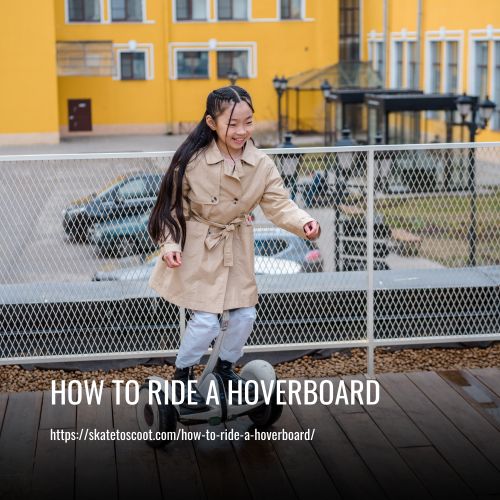
You’re standing. Now you need to go. The control scheme is deceptively simple: lean to go.
To move forward: Shift your weight forward by pressing your toes down slightly or leaning your torso forward. Do not bend at the waist. Think about moving your hips forward over your toes. The board will drive the wheels forward to keep up with your shifting center of gravity. Start with tiny shifts. A millimeter of pressure is enough.
To move backward: Shift your weight backward by pressing your heels down or leaning your torso back. Again, keep your back straight. The board will reverse.
To stop: Return to a perfectly upright, neutral stance. The board will decelerate smoothly to a stop. Do not jump off. Do not lean back violently to brake, that’s a command for high-speed reverse, not a stopping mechanism.
The Swagtron T380 manual offers a crucial warning here: “Avoid turning suddenly when riding fast, as this may result in accidents.” Speed amplifies every input. If you need to stop quickly, the safest method is to gradually straighten up, let the board come to a halt, and then dismount.
| Control Input | Board Response | Rider Sensation |
|---|---|---|
| Toes down / Lean forward | Wheels drive forward | Feeling of being gently pulled forward from the ankles |
| Heels down / Lean backward | Wheels drive backward | Feeling of being gently pushed from the calves |
| Return to upright neutral | Smooth deceleration to stop | Platform stabilizes beneath you |
Turning Techniques: Foot Twist vs. Body Lean
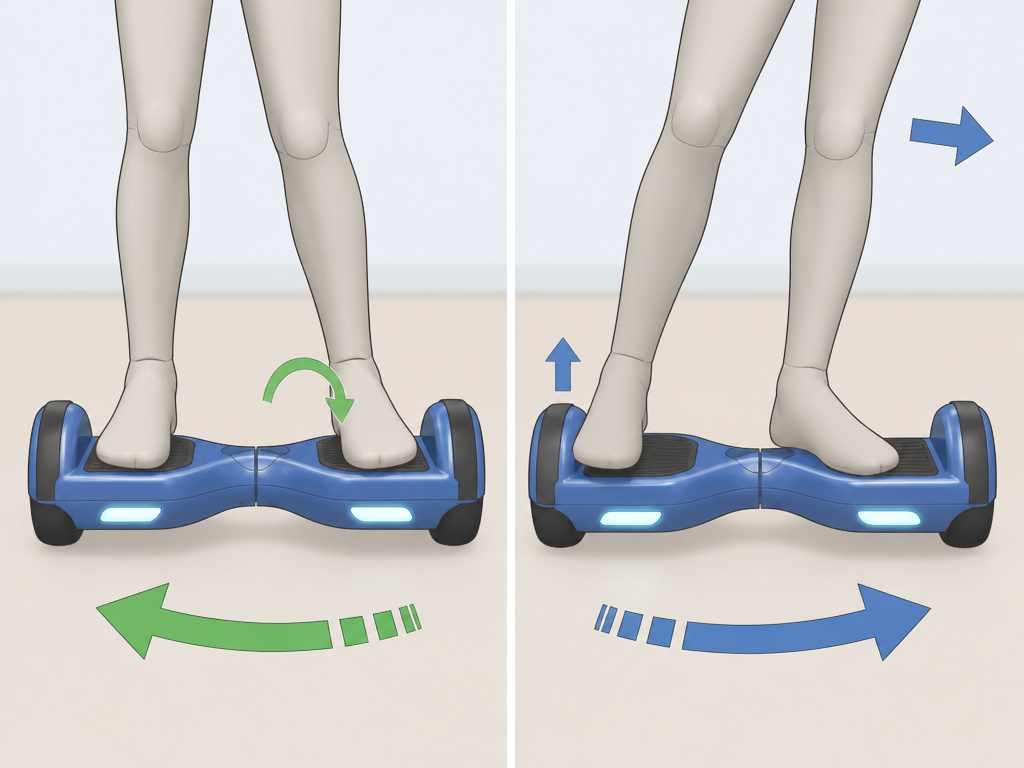
Here’s where the manuals disagree, and your board’s brand dictates your technique. This isn’t a minor detail, using the wrong method on your model leads to sluggish or erratic turns.
The HighRoller Model C manual is specific: “Left foot forward turns right” and “Right foot forward turns left.” This describes a foot-twist method. You keep your torso facing forward but twist your right foot forward (toes ahead of heels) to turn left, and vice versa. It’s a subtle, ankle-driven motion.
The Swagtron T380 manual describes a body-lean method. To turn right, lean your body slightly right and shift weight off the left pedal. To turn left, lean left and shift weight off the right pedal. Your torso and hips initiate the turn.
Where this goes sideways: Mixing the techniques. If your board uses foot-twist and you try body-lean, you’ll over-lean, the board will interpret it as an acceleration command, and you’ll shoot off in a jerky arc. Find your manual and practice the indicated method in a wide, open space before attempting tight turns.
Start with wide, gentle arcs. As you get comfortable, you can combine a slight foot twist with a body lean for sharper, more controlled turns. The board’s learning mode, if available, is perfect for practicing this. It limits top speed and softens the response curve, giving you more time to react.
How to Dismount Safely (Without Falling Backwards)
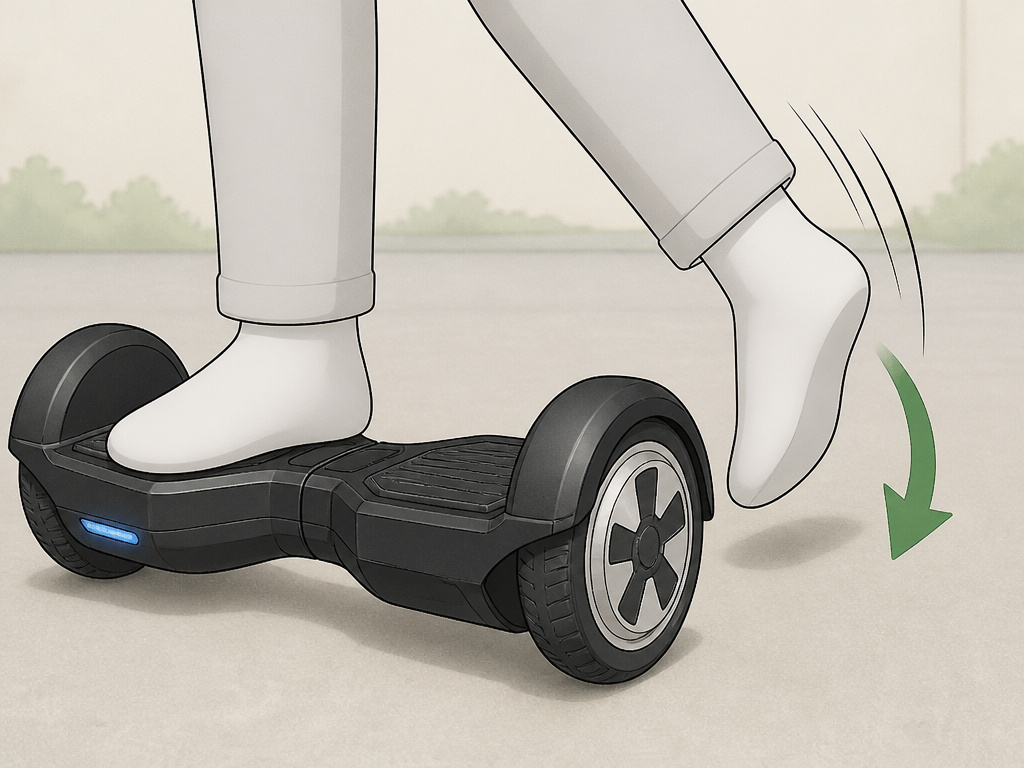
Getting off is where pride often goes before a fall. The instinct is to step straight back. That’s a recipe for a low-speed tip-over.
The correct sequence, per the Swagtron T380 manual:
- Bring the board to a complete stop.
- Look behind you to ensure your path is clear.
- Step back with your dominant foot, placing it firmly on the ground behind the board.
- As your weight transfers to your back foot, lift your other foot off its pedal and bring it down to meet the first. Step away from the board.
The key is the backward step. It moves your center of gravity off the board and onto stable ground. Stepping forward or sideways leaves your weight partially on the pedals, which can cause the board to dart out from under you. For a visual guide and common errors, see our full tutorial on how to get off safely.
Hoverboard Modes and Battery Management
Your board isn’t a single-speed device. Some models, like the Swagtron T380, have selectable riding modes. Using them correctly shortens the learning curve drastically.
- Learning/Beginner Mode: Limits top speed (often to 4-5 mph) and increases the sensitivity of the weight sensors. This is the setting for your first 2-3 hours. It’s the difference between a gentle nudge causing a slow roll and the same nudge causing a sudden sprint.
- Standard Mode: The normal operating speed, usually around 6-7 mph as listed in the HighRoller C manual.
- Advanced/Pro Mode: Activates the board’s maximum speed (capped at around 10-12 mph on most consumer models) and sharpens the controls for quicker response.
Switching between these riding modes is usually done via a button sequence or a companion app. Start in beginner mode and don’t rush out of it.
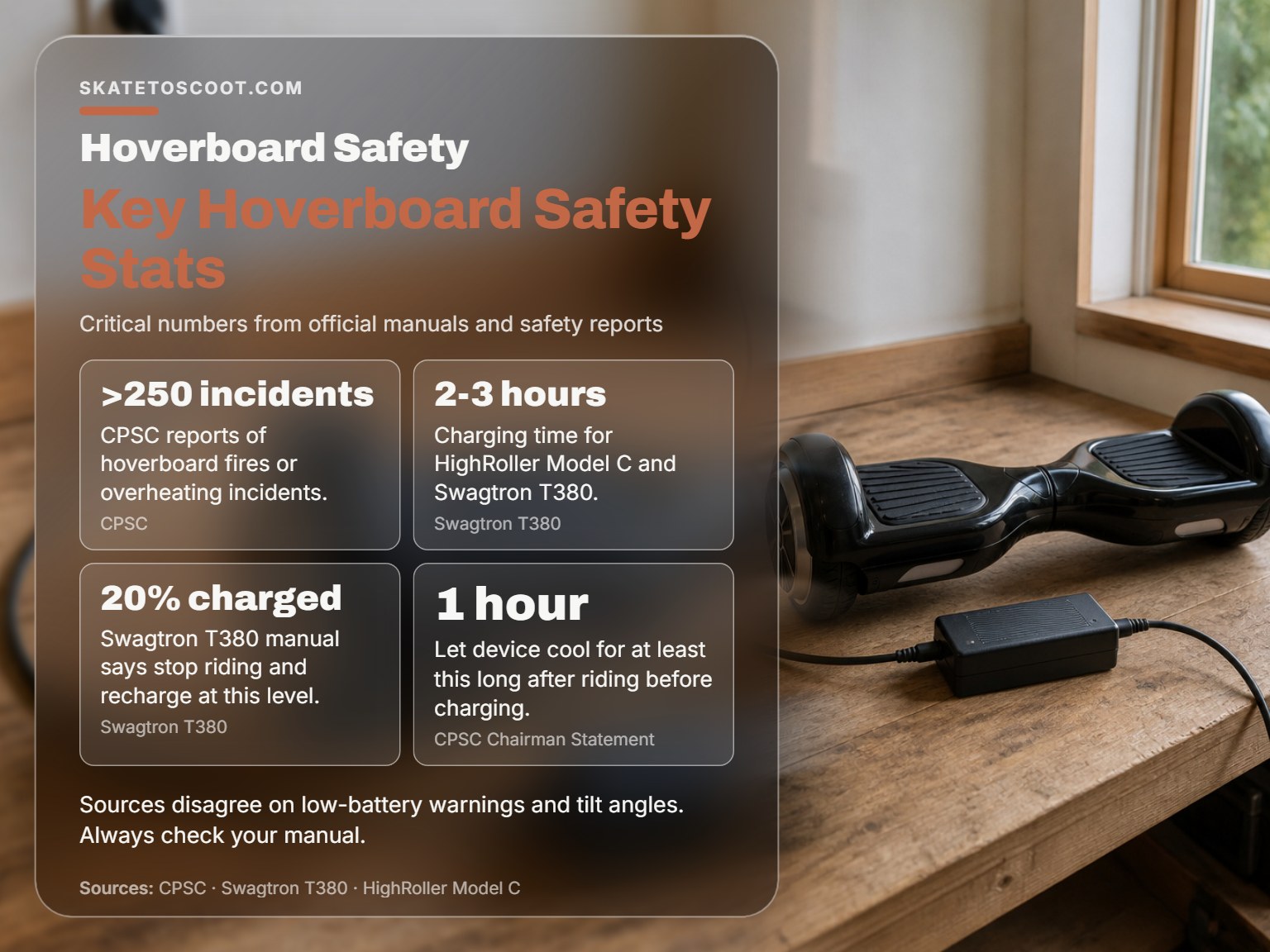
Battery management is a safety issue, not just a convenience. The manuals disagree on the specific low-battery threshold and also on the turning mechanism, but agree that ignoring low-battery warnings is dangerous.
| Model | Low-Battery Warning | Consequence of Ignoring |
|---|---|---|
| Swagtron T380 | Stop riding and recharge when indicator shows 20% charged. | Continued drain can permanently reduce battery capacity. |
| HighRoller Model C | Do not continue riding when battery is exhausted or low-battery indicators are active. | May lead to injury. The engine will turn off after 15 seconds. |
| Jetson V8 Sport | Do not ride when battery is low, as indicated by a twinkling or solid green light. | Risk of sudden power loss and loss of control. |
Plug it in using only its supplied charger, in an open, dry area away from anything flammable, and never leave it charging unattended. The CPSC chairman safety statement adds a critical timing note for anyone learning how to ride a hoverboard: let the device cool for at least an hour after riding before you plug it in.
Practice Drills for Your First Hour
You know the controls. Now you need the muscle memory. This hour is about drills, not distance.
Drill 1: The Rock. On your board, practice shifting your weight ever so slightly forward until you creep ahead one foot, then shift back to return to your start point. Do this ten times. Feel the connection between your ankle flex and the wheel movement.
Drill 2: The Pendulum. In a safe, open area, ride forward in a straight line for 10 feet, come to a controlled stop, then ride backward to your start. Repeat five times. This builds confidence in deceleration.
Drill 3: Wide Figure Eights. Set up two markers 15 feet apart. Practice making wide, looping turns around them in a figure-eight pattern. Focus on using the turning method specified for your board. This is where you learn to link direction changes smoothly.
Keep sessions short, 20 to 30 minutes max. Fatigue leads to sloppy posture and slow reactions. When you’re ready to progress, the path leads to cool tricks and more advanced maneuvers, but only after these fundamentals are automatic.
How fast can a hoverboard go?
Hoverboards have a built-in speed limit for safety. The HighRoller Model C has a speed limit of about 6 miles per hour (9.6 km/hr). This limit is set by the manufacturer to help maintain stability and control. Riding at this maximum speed requires a smooth, flat surface and your full attention. Avoid making sudden turns when moving quickly, as this can cause you to lose balance. The board’s self-balancing system relies on sensor input from your feet, and aggressive maneuvers at speed can overwhelm it. Always be aware that your actual safe speed will be lower on uneven terrain, slopes, or in crowded areas.
Frequently Asked Questions
How long does it take to learn to ride a hoverboard?
Most adults can achieve basic control, mounting, straight-line travel, stopping, and wide turns, within 30 to 60 minutes of focused practice. Feeling truly confident at slower speeds typically takes 2-3 hours. The variable isn’t innate balance; it’s how quickly you learn to trust the board’s self-balancing system and commit your weight.
Are hoverboards safe for kids?
They can be, with strict supervision and the right model. Some models, like the HighRoller Model C, have a weight limit of 44-225 lbs (20-102 kg). The critical factor is maturity and the ability to follow safety instructions. Always use beginner mode, full safety gear, and practice in a controlled environment. We have a dedicated guide on how to teach a kid that covers age-appropriate pacing.
Why won’t my hoverboard turn on?
First, ensure it’s charged. If it has power but won’t activate, place it on a perfectly flat surface and try again. Many boards have a tilt-safety lock that prevents startup on an incline. If it still fails, check for error lights or beep codes in the manual. Never attempt to open or repair the battery yourself.
Can I ride a hoverboard on grass or gravel?
Officially, no. Manufacturer manuals specify smooth, hard surfaces like pavement or indoor flooring. Riding on rough terrain can damage the board and void warranties. Riding on rough terrain also voids many warranties, as stated in the Jetson V8 Sport manual regarding “weather related water damage.”
What is the best hoverboard for a beginner?
Look for a UL 2272-certified model with a clear “beginner” or “learning” mode, clear indicator lights, and a weight limit that fits the rider. Brands like Swagtron often build these features in. The “best” model is the one you can verify as safe and that fits your budget. For a curated list, see our review of the best beginner hoverboards.
The Bottom Line
Learning to ride a hoverboard is a 30-minute mechanical process wrapped in a two-hour psychological one. The board’s gyroscopes will keep you upright; your job is to give them clean, committed inputs. Start flat, start geared up, and start in beginner mode. Respect the low-battery warnings and the charging fire hazards documented by the CPSC, those numbers are real, and the consequences are measured in lives and property.
Your first milestone isn’t a trick or a top speed. It’s the moment you step on, feel the platform stabilize, and think “go” instead of “don’t fall.” Everything after that, the smooth turns, the confident stops, the eventual tricks, flows from that fundamental trust in the machine and in your own calibrated weight shift. Now go find a flat patch of pavement and put an hour into it. The board is waiting.