How to Fix Electric Scooter Brakes: Step-by-Step
This post contains affiliate links. As an Amazon Associate, we earn from qualifying purchases.
To fix electric scooter brakes, first identify your brake type, mechanical cable, hydraulic disc, or electronic/regenerative, then follow the specific procedure: adjust cable tension, replace worn pads, bleed hydraulic lines, or clear error codes. The process requires basic tools like a 10mm wrench and a caliper to check pad thickness against manufacturer wear limits.
The core of the problem is usually one of three things: a stretched cable, a worn-out friction surface, or air in a hydraulic line. Each has a distinct feel and sound. A loose cable makes the lever pull all the way to the grip with a soft, mushy resistance. Worn pads or a contaminated rotor cause a high-pitched squeal or a scraping grind. A hydraulic system with air feels spongy and fails to build pressure. Understanding these symptoms is the first step in learning how to fix electric scooter brakes.
What follows is the full diagnostic map. We’ll walk through identifying your specific brake system, the exact tools you need, and the step-by-step fixes for each failure mode, including the model-specific numbers you must not ignore in your how to fix electric scooter brakes project.
Key Takeaways
- Start every repair by disconnecting the charger and turning the power OFF, as the Razor manual mandates, but note that some procedures, like the Niu N1S rear pad alignment, require the ignition ON.
- Use a digital caliper to measure pad and disc thickness against your scooter’s official wear limits; for a Niu N1S, replace front brake pads when they reach the 3.0mm usability limit; the front disc has a standard thickness of 4.0mm and must be replaced at its 3.0mm usability limit.
- For a spongy hydraulic brake lever, bleed the system with the fluid specified by your manual. The Niu N1S manual specifies DOT3 or DOT4, but note that these fluids are not universally interchangeable without potential seal compatibility issues.
- Electronic brake faults, signaled by codes like E4 on a Wilfa E-500, require a software reset (“restart”) before any mechanical intervention, a layer most guides miss.
- Always test brakes at low speed first, then gradually increase to high-speed, as the E-Wheels manual instructs; a parking lot test is not a road test.
The First Step: Identify Your Brake Type
Look at the brake mechanism around your wheel. A mechanical cable brake has a thin metal cable running from the lever to a caliper or drum. You’ll see an adjuster barrel near the lever or where the cable enters the housing. A hydraulic disc brake has a closed, fluid-filled line connecting the lever to a caliper with one or two pistons; there’s no visible cable. An electronic or electromagnetic brake, common on mobility scooters like the Invacare Cetus, has a thick wire bundle leading to a motorized brake plate and no traditional lever action.
The type dictates your entire repair path. Getting this wrong means buying the wrong parts and wasting an afternoon. I’ve watched students try to bleed a cable system. It doesn’t work.
Common mistake: Assuming all scooters use the same brake system. A Razor Power Core E100 uses a simple mechanical caliper, while a Niu N1S uses a precision hydraulic system, the tools, fluids, and safety steps are completely different.
Tools You’ll Need (And One You Might Not)
You can start most brake jobs with a basic toolkit. For cable adjustments, you need a set of Allen keys (hex wrenches) and a 10mm open-end wrench, which is called out specifically in the Razor Power Core E100 and Invacare Cetus service manuals. For pad replacement, add a set of needle-nose pliers and a digital caliper.
The caliper is the tool most DIY guides tell you to skip. They say “check for wear,” but don’t tell you how. A visual inspection is useless once pads are down to the last millimeter. The Niu N1S manual gives you the numbers: a front hydraulic pad is 4.0mm new and must be replaced at 3.0mm. Without a caliper, you’re guessing. A $20 tool from the hardware store removes the guesswork and tells you definitively if you’re doing a five-minute adjustment or a part replacement.
For hydraulic work, you’ll need a brake bleeding kit specific to your scooter’s fitting type (usually a standard automotive kit works), a bottle of DOT3 or DOT4 brake fluid, and a torque wrench.
| Tool | Used For | Critical For |
|---|---|---|
| 10mm Wrench | Cable tension adjustment | Razor, Invacare Cetus models |
| Digital Caliper | Measuring pad/disc thickness | Verifying Niu N1S wear limits |
| Brake Bleeding Kit | Hydraulic system service | Replacing fluid, removing air |
| Torque Wrench | Fastening disc & caliper bolts | Applying Niu-specified 5-9 N•m |
| Needle-Nose Pliers | Removing/installing retention clips | Pad swaps on mechanical disc brakes |
Step-by-Step Brake Adjustment
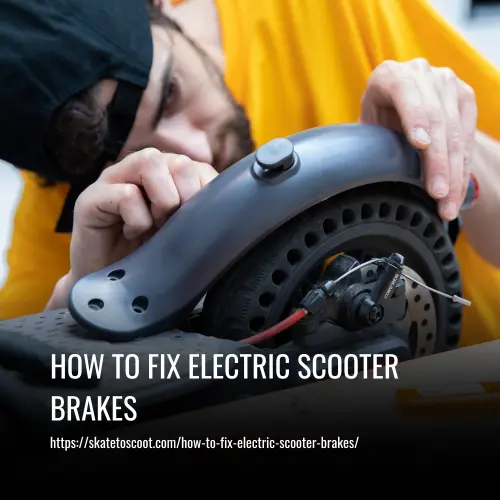
Follow this sequence. Skipping steps or doing them out of order creates new problems.
- Secure the scooter and disable power. Place the scooter on a stand so the wheel spins freely. Before touching anything, disconnect the charger and turn the power switch to OFF. The Razor Power Core E100 manual makes this its first, bolded step. Other manuals, like the Niu N1S, sometimes instruct you to turn the ignition ON during adjustment to rotate the wheel. This is a direct contradiction. Follow the Razor rule as your universal safety baseline: power off, always.
- Inspect the system. Spin the wheel. Listen for scraping. Look at the brake pads through the caliper. Check that the cable is intact and firmly locked into the lever and caliper. The Invacare Cetus manual warns that a cable not tightly locked in the brake plate’s locking screw “may cause a brake system failure.”
- Adjust cable tension. Locate the barrel adjuster where the cable meets the lever. Turn it counterclockwise a half-turn to take up slack. Pull the lever. It should engage the brake about halfway through its travel. If the adjuster is maxed out, you need to reset it: loosen the 10mm locknut at the caliper, pull the cable taut by hand, and retighten the nut. This is the most common electric scooter repair for basic models.
- Center the caliper. For disc brakes, loosen the two caliper mounting bolts just enough so the caliper can wiggle. Squeeze and hold the brake lever. This centers the caliper over the rotor. While holding the lever, tighten the bolts back up. This fixes the intermittent grinding noise new scooters often have out of the box.
- Test before riding. With the wheel still elevated, spin it and apply the brake. It should stop smoothly and quietly. Then, perform the low-speed test the E-Wheels manual dictates: test at a walking pace first, then gradually work up to higher speeds.
I’ve seen a dozen students snap a brake cable because they forced a frozen adjuster. If the barrel won’t turn with firm finger pressure, spray a drop of penetrating oil on the threads, wait five minutes, and try again. Force is the enemy here.
When to Replace vs. Adjust
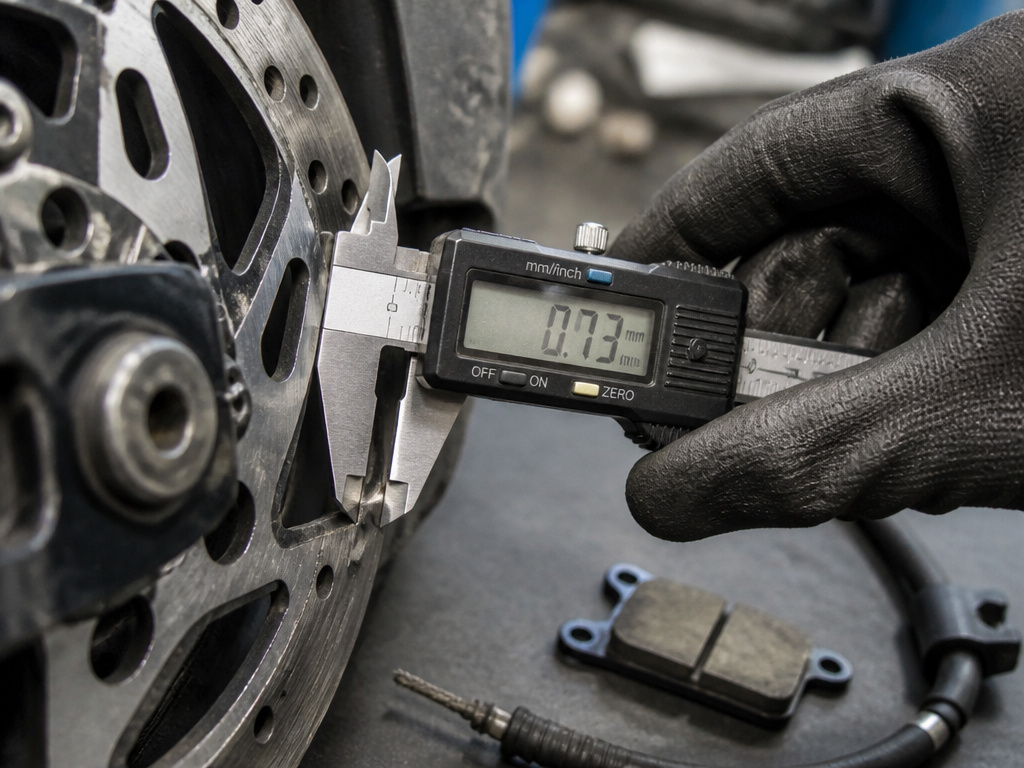
Adjustment is for slack cables and misaligned calipers. Replacement is for worn-out parts. The line is defined by hard numbers.
If your measurements are at or below these limits, no amount of adjusting will restore safe braking. You need new parts.
For mechanical brakes without published specs, consult your scooter’s manual for wear limits. If the pad material is less than 1mm thick at any point, replace it. If the cable housing is frayed or the inner cable has broken strands, replace the entire cable. A temporary adjustment on a worn-out system is unsafe.
| Condition | Action: Adjust | Action: Replace |
|---|---|---|
| Brake Lever Travel | Lever pulls to halfway, brakes engage. | Lever pulls to handlebar, little to no braking. |
| Pad Thickness (Niu N1S) | Above 3.0mm (front) or 3.0mm (rear). | At or below 3.0mm (front) or 3.0mm (rear). |
| Cable Condition | Intact housing, no strand breaks. | Frayed housing, broken inner strands. |
| Rotor/Disc Condition | Minor surface rust, slight discoloration. | Deep grooves, warping, thickness below limit. |
| Noise | Light squeal when wet. | Constant grinding or scraping. |
Bottom line: If your measurement is at the wear limit, replace the part. Adjusting a spent component is a safety gamble.
Bleeding Hydraulic Brakes
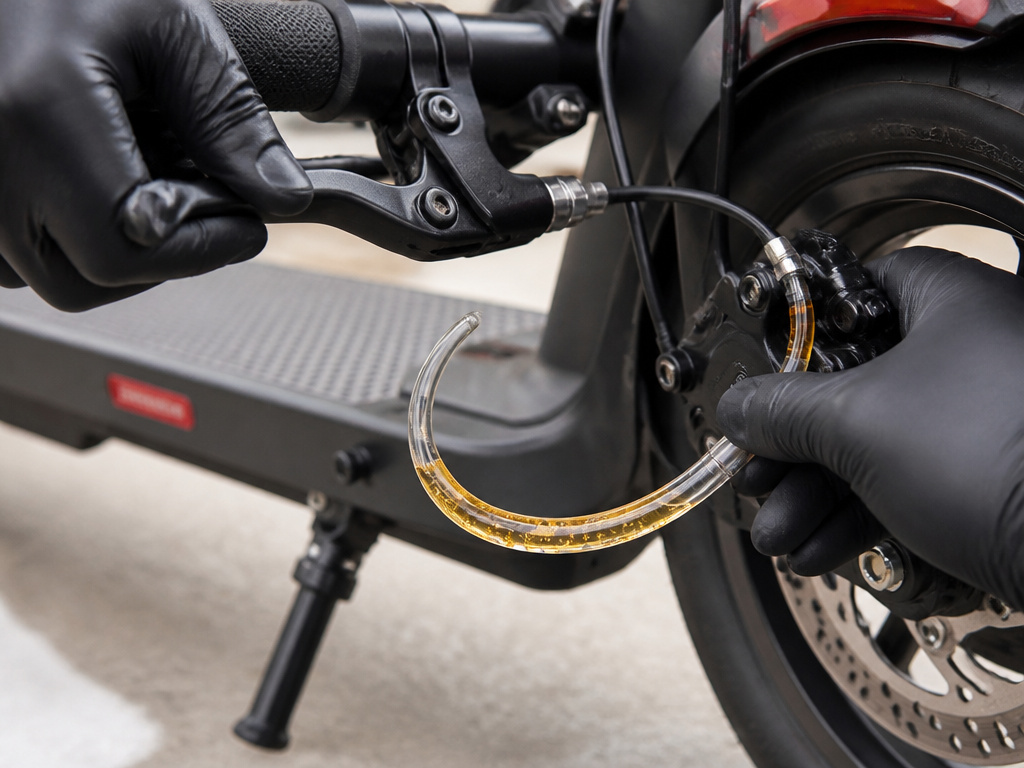
A spongy lever that goes to the bar is the classic sign of air in the hydraulic line. Bleeding removes the air. The Niu N1S manual specifies using DOT3 or DOT4 brake fluid. This is a generic spec; some vehicle manufacturers specify only one. Using the wrong type can damage rubber seals over time. When in doubt, use the fluid type printed on your master cylinder reservoir cap.
- Fill the reservoir at the brake lever with fresh fluid. Attach a bleed tube to the bleed nipple on the caliper.
- Open the nipple a quarter-turn. Slowly pump the brake lever. You’ll see air bubbles travel up the tube into your catch bottle.
- Close the nipple before releasing the lever each time to prevent air being sucked back in.
- Keep pumping until the fluid runs clear with no bubbles and the lever feels firm.
- Top up the reservoir, ensuring no fluid spills on paint or plastic, it’s corrosive.
This process is messy and exacting. If you’re not comfortable, it’s a valid time to take your scooter to a shop. A botched bleed leaves you with no brakes at all.
Troubleshooting Electronic & Error Code Brakes
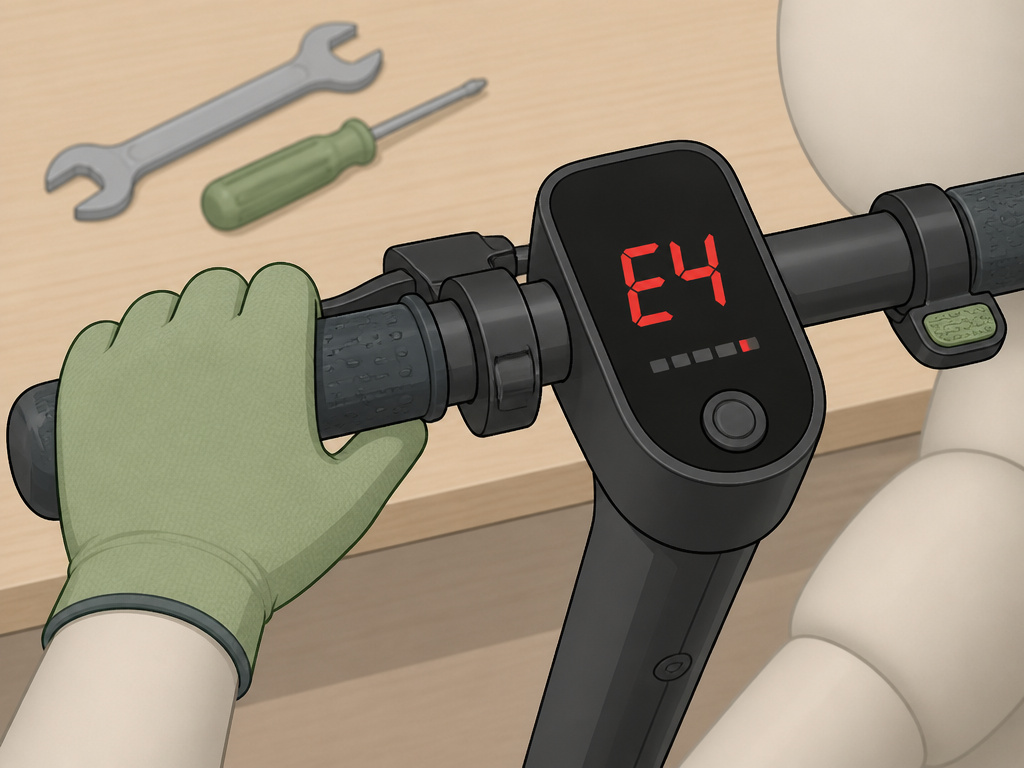
Modern scooters add a digital layer. The Wilfa E-500 lists an “E4” error code for brake system malfunction. Its prescribed fix isn’t mechanical first: 1. Release brake, 2. Restart, 3. Replace brake lever. The “restart” is a software reset. Ignoring it and going straight for the tools is a waste of time.
The E-Wheels E2S V3 MAX manual lists a suite of error codes. E21 (BMS communication abnormal) and E24 (system voltage abnormal) both tell you to replace the battery. E33 and E58 point to overheating, you let the scooter rest and cool down. These aren’t mechanical brake fixes for the how to fix electric scooter brakes question; they’re diagnoses for an integrated electrical system. If your scooter has a display, an error code is your starting point.
For electromagnetic brakes like on the Invacare Cetus, the manual splits the world in two. If the problem is with the brake plate or cable, fix it mechanically. If the electromagnetic brake itself is faulty, “please refer to the electromagnetic brake repair.” This is a specialized procedure involving high-voltage circuits. The manual’s personal safety notice is blunt: “There are high-voltage circuits in the scooter system, which can cause electric shock.” This is not a DIY moment for most people.
The 4 Most Common Brake Problems (And Their Fixes)
Owners on forums ask the same questions. Here’s the short list.
-
“My brake lever is soft and goes to the handlebar.”
- Likely Cause: Air in hydraulic line or severely worn pads.
- Fix: Bleed hydraulic system or replace pads. Check for leaks at fittings.
-
“My brakes are squealing/screeching.”
- Likely Cause: Contaminated pads/rotor (oil, dirt) or glazed pads.
- Fix: Remove pads, sand surfaces lightly with coarse sandpaper, clean rotor with isopropyl alcohol. If contamination is severe, replace pads.
-
“My wheel won’t spin freely; the brake is rubbing.”
- Likely Cause: Misaligned caliper or bent rotor.
- Fix: Loosen caliper bolts, squeeze lever to re-center, retighten. For a bent rotor, use an adjustable wrench to gently bend it back straight, using a clean cloth to protect the surface.
-
“My scooter shows an error code and won’t brake/accelerate.”
- Likely Cause: Electronic fault (sensor, BMS, controller) or a brake sensor issue preventing movement.
- Fix: Note the exact code (e.g., E4, E21). Consult your manual. Often, a full power cycle (turn off, wait 60 seconds, turn on) clears transient errors. Persistent codes need professional diagnosis.
Safety First: What the Manuals Really Say
The OEM service manuals are your highest authority, and they disagree on fundamentals. The Razor Power Core E100 PDF is safety-first: disconnect power before any work. The Niu N1S manual, during its complex rear pad alignment, tells you to turn the ignition ON to rotate the wheel. One assumes no live voltage, the other requires it.
You must follow the manual for your specific scooter. When in doubt, the Razor rule is the safer default. The Niu manual also carries severe warnings for its complex procedures, noting “high-voltage circuits” and mandating eye protection for tasks like drilling. This isn’t scare talk. It’s the manufacturer’s legal acknowledgment that you can hurt yourself.
Before any brake work, do this:
- Work in a well-lit, dry area.
- Use the correct tool for the fastener, a metric hex key, not a star-shaped Torx.
- Wear safety glasses, especially when dealing with springs, compressed air, or prying parts.
- Never skip the final low-speed function test. A brake that works off the ground can fail under riding load.
Where this goes sideways: Assuming “tight enough” is good enough for critical fasteners. Guessing that with a standard wrench can lead to a wheel detaching at speed.
Frequently Asked Questions
Why are my electric scooter brakes not working?
The three main reasons are excessive cable slack, worn-out brake pads, or air in a hydraulic line. A visual and functional inspection, checking lever travel, pad thickness, and lever firmness, will pinpoint which one. Don’t forget to check for electronic error codes on your display.
How do I fix squeaky electric scooter brakes?
Squeaking is usually caused by vibration between the pad and rotor. Clean the rotor thoroughly with isopropyl alcohol to remove any oil or brake dust. If that doesn’t work, lightly sand the surface of the brake pads to remove any hardened, glazed material. Ensure the caliper is perfectly centered so the pad contacts the rotor evenly.
Can I adjust the brakes myself?
Yes, for basic cable tension and pad alignment adjustments, you can likely do it yourself with a 10mm wrench and some patience. For hydraulic brake bleeding or diagnosing complex electronic faults, the required precision and safety knowledge increase significantly. If you’re unsure, seeking a professional for scooter repair is the safer choice.
How often should I replace my scooter brake pads?
There’s no set mileage. It depends on your riding style, terrain, and brake type. The only reliable method is to measure pad thickness monthly against your scooter’s wear limit (e.g., 3.0mm for a Niu N1S). Aggressive stop-and-go city riding wears pads out far faster than casual cruising.
What does error code E4 mean?
On a Wilfa E-500 scooter, error code E4 indicates a brake system malfunction. The manufacturer’s troubleshooting sequence is: 1. Release the brake lever fully, 2. Restart the scooter, 3. If the code remains, replace the brake lever assembly. This highlights that the first step is often an electronic reset, not a mechanical fix.
Are hydraulic brakes better than mechanical on scooters?
Hydraulic brakes generally offer more consistent, powerful braking with less hand effort and are self-adjusting for pad wear. However, they are more complex to repair and require specialized knowledge and tools for bleeding. Mechanical brakes are simpler, cheaper to fix, and most riders can adjust them with basic tools. For average use, a well-maintained mechanical system is perfectly adequate.
Before You Go
Brake maintenance isn’t about making your scooter last longer. It’s about making sure it stops when you need it to. You should never compromise on a brake repair because it’s “probably fine.”
If you take away one thing, let it be this: buy the digital caliper. Knowing the exact thickness of your pads transforms brake service from a guessing game into a scheduled, predictable task. You’ll know three weeks in advance that you need to order new pads, instead of discovering it on a rainy ride home.
Everything covered here assumes your scooter is in good working order otherwise. If you’re also dealing with wiring problems or a faulty throttle, fix those first. A brake system can’t compensate for a faulty power delivery system. Start with the foundation, then build up the safety margins. That’s the goal.